
How to Create Effective Website Content: 9 Tips You Need to Know

Effective website content is key to your business’s success online. Whether you have an online store, a blog, or a company website, your content is what helps you connect with visitors and turn them into customers. Good content doesn’t just give information; it grabs attention, builds trust, and persuades people to act. 

Creating great website content is more than just writing words. It’s about giving your audience what they need. When you understand what your visitors are looking for, and create content that solves their problems or answers their questions, you’ll attract more visitors and keep them on your site longer. This can lead to more sales, sign-ups, or other actions you want them to take. 

In short, the best website content speaks to your audience’s needs and guides them toward what they should do next. When your content is helpful and valuable, it helps grow your business and builds a strong relationship with your customers.

1. Understanding Your Audience: The Key to Effective Website Content

To write content that resonates with your audience, you need to first understand who they are. Creating content for the right audience is essential for increasing engagement and conversions. Effective website content starts with knowing your audience.
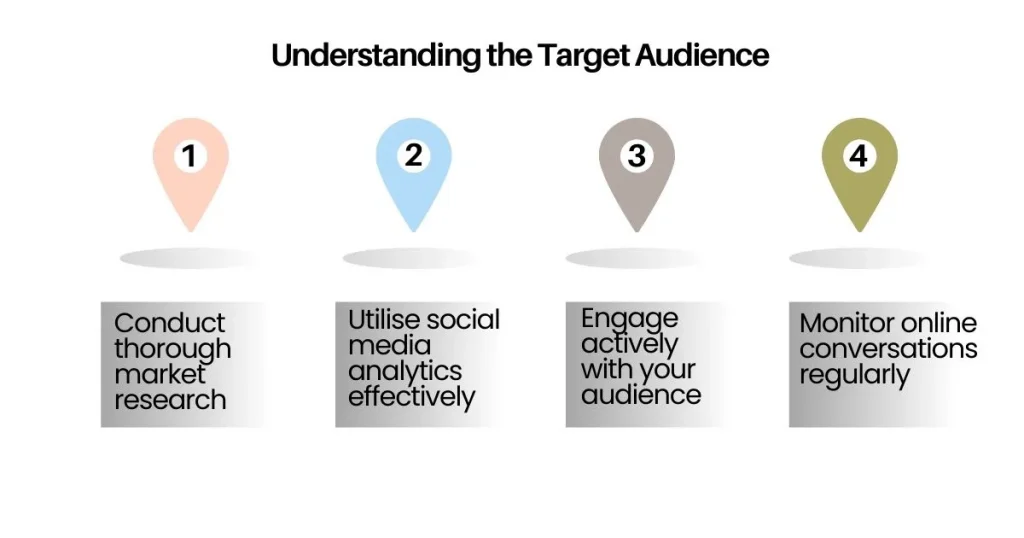
Defining Your Audience

  • Demographics: Age, gender, location, income, etc.
  • Psychographics: Interests, attitudes, and lifestyle choices.
  • Needs and Challenges: What are your audience’s pain points? What are they seeking?
  • Buyer Personas: Creating detailed buyer personas helps you understand the motivations of your ideal customers.

Tools to Understand Your Audience

  • Google Analytics: Use data from Google Analytics to learn who’s visiting your website and what they’re doing.
  • Surveys and Feedback: Ask your current audience for feedback on what they need.
  • Social Media Insights: Platforms like Facebook, Instagram, and Twitter offer tools to track engagement and audience demographics.

By creating audience profiles, you will be able to craft effective website content that speaks directly to their needs and preferences.

2. Setting Clear Goals for Your Effective Website Content

Every piece of content on your website should have a purpose. Whether you want to inform, entertain, or encourage people to take action, having clear goals for your content helps you stay focused. Effective website content should always align with specific goals.

Identifying Content Goals

  • Informative Content: Articles or blogs that educate your audience.
  • Conversion-Focused Content: Pages that drive sales, like product descriptions or landing pages.
  • Engagement Content: Social media links, interactive sections, and comment areas.
  • Customer Retention Content: Email newsletters or updates that keep customers coming back.

Aligning Content with Business Goals

Your content should always align with your business goals. For example, if you run an online store, your product pages should focus on encouraging sales. If you offer a service, your content should focus on lead generation. Creating effective website content starts with this alignment.

3. Creating Compelling Headlines for Effective Website Content

Your headline is the first thing people see, so it’s important to make it catchy and clear. A great headline can make a big difference in whether someone decides to keep reading or not. This is crucial for effective website content.

What Makes a Strong Headline?

  • Clarity: Keep it simple. Your headline should clearly explain what the content is about.
  • Value: Let the reader know what they’ll gain by reading the content.
  • Urgency: Phrases like “limited time” or “important” can make people act quickly.
  • Curiosity: Tease the reader with something they’ll discover in your content.
  • Keywords: Use keywords that people are likely searching for, especially for SEO.

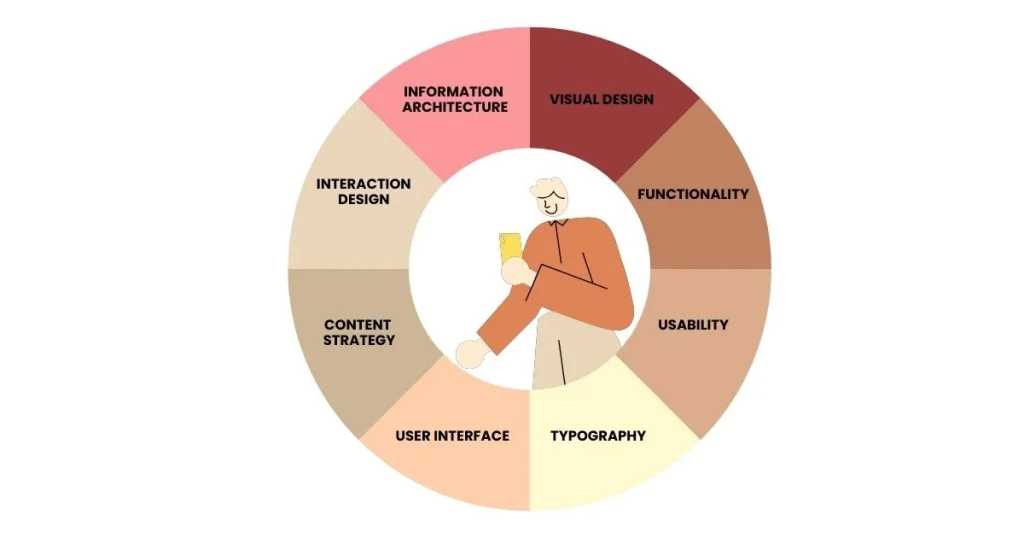
4. Optimising Effective Website Content for User Experience (UX)

User experience (UX) is how visitors feel when they use your website. If your site is hard to use or slow to load, people will leave quickly. But if it’s easy to navigate and loads fast, they’ll stay longer and may take action. Effective website content is always designed with UX in mind.
Key Aspects of UX

  • Readability: Use big, clear fonts, short paragraphs, and enough space between lines.
  • Navigation: Make sure it’s easy for visitors to find what they need with clear menus and links.
  • Mobile-Friendly: Since many people browse on phones, your content should look good on all devices.
  • Fast Loading: A slow website frustrates users and hurts your rankings. Optimise images and minimise heavy scripts.

Tools for Improving UX

  • Heatmaps: Tools like Hotjar can show where visitors click on your site, helping you improve content layout.
  • User Testing: Test your site with real users to gather feedback and make improvements.
  • Responsive Design: A responsive design makes sure your content adapts well to different screen sizes, whether on phones, tablets, or desktops.

5. Writing Clear and Engaging Effective Website Content

Now that you have a plan and your site is user-friendly, it’s time to focus on writing content that your audience will enjoy and find useful. The key to effective website content is clarity and engagement.

Write in a Friendly, Simple Way

  • Use easy, everyday language that everyone can understand.
  • Talk directly to your readers by using “you” – it helps build a connection.
  • Skip the fancy jargon, unless your audience is used to it.

How to Structure Your Content

  • Introduction: Start by grabbing attention and explaining what the content is about or what problem it will solve.
  • Body: Break your content into small, easy-to-read sections with subheadings, bullet points, and pictures.
  • Conclusion: End with a summary of the key points and a call-to-action (like “sign up” or “learn more”).

Make Your Content Easy to Scan

  • Use bullet points to make key ideas stand out.
  • Make important words bold so they grab attention.
  • Keep your paragraphs short and simple to read.

6. Optimising Effective Website Content for SEO

Search engine optimisation (SEO) helps make your content easier to find online. Without SEO, even the best effective website content won’t reach its full potential.

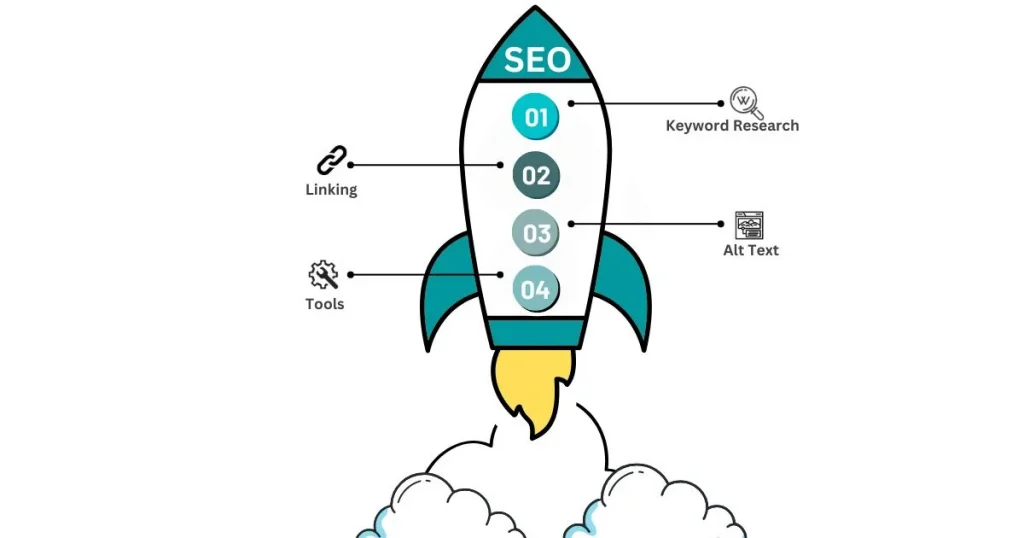
Improve Your Content

  • Keyword Research: Research words people use to search for your topic.
  • Linking: Add helpful links to other pages and websites.
  • Alt Text: Write short descriptions for images to make them accessible.
  • Tools: Try tools like Grammarly or SEO plugins to refine your content.
Keyword Research

  • Long-Tail Keywords: These are specific phrases that may be easier to rank for and can bring in more targeted visitors.
  • Google Keyword Planner: A tool that helps you find keywords that people are searching for.
  • SEO Tools: Use tools like SEMrush, Ahrefs, and Moz to track how well your content is doing.

On-Page SEO

  • Meta Descriptions: Write short, attractive descriptions that encourage people to click on your page from search results.
  • Title Tags: Include your main keyword in your title tags to help search engines understand what your page is about.
  • Internal and External Links: Link to other pages on your website and to trustworthy external websites to improve SEO.

7. Writing for Conversions: Call-to-Action (CTA) Strategy

A Call-to-Action (CTA) is a prompt that tells your visitors what to do next after reading your content. Whether it’s signing up for a newsletter, making a purchase, or reaching out for more information, a good CTA can guide them towards taking action. Effective website content always includes a strong CTA.

How to Write Effective CTAs

  • Use Strong Action Words: Choose words like “buy now,” “get started,” or “download” to make it clear what action you want them to take.
  • Offer Value: Let visitors know what they’ll get by clicking. For example, “Get your free guide” or “Join today for exclusive discounts.”
  • Create Urgency: Words like “limited-time offer” or “last chance” can encourage people to act quickly.

8. Proofreading and Editing Effective Website Content

Once your content is written, the next step is to proofread and edit it. This ensures your content is error-free and polished before publishing.

Common Mistakes to Avoid

  • Spelling and Grammar Errors: These can make your content look unprofessional, so always check for mistakes.
  • Awkward Sentences: If a sentence doesn’t flow smoothly, rewrite it so it’s easier to understand.
  • Overusing Jargon: Use simple language unless your audience expects technical terms.

9. Monitoring and Updating Effective Website Content

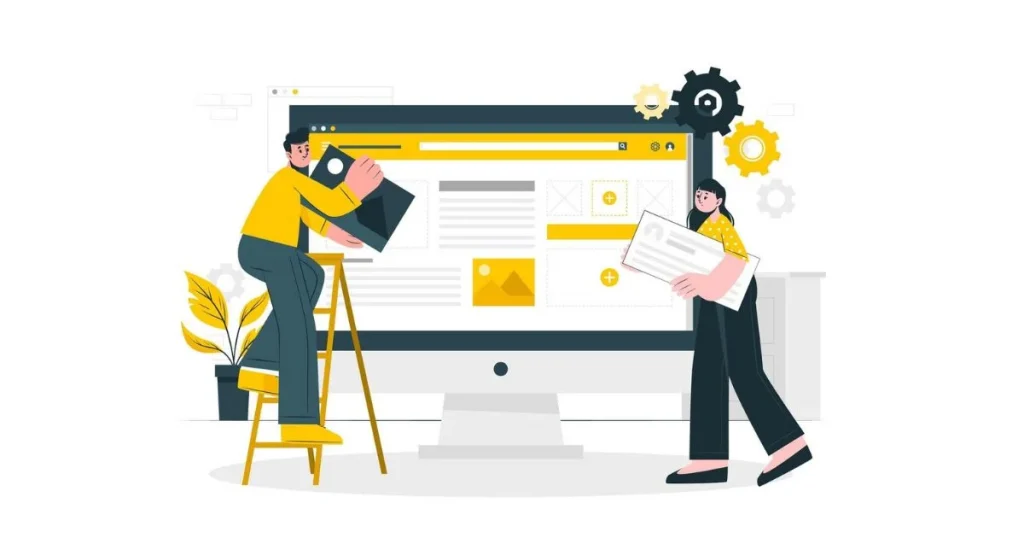
Once your content is live, it’s important to keep an eye on it and make updates when needed. This ensures it stays useful and continues to bring in visitors.
Monitor Your Content’s Performance

  • Use Google Analytics to track how your content is performing, including traffic, bounce rate, and more.
  • Monitor conversion rates to see if your content is helping you achieve goals like making sales or gaining sign-ups.

Keep Your Content Updated

  • Refresh old content with up-to-date information to maintain its relevance.
  • Add new case studies, testimonials, or examples to keep your content engaging.
  • Repurpose existing content into other formats like videos or infographics for broader reach.

Conclusion

Creating great website content takes time, but it’s worth it. By understanding your audience, setting clear goals, writing in a simple, friendly tone, optimising for SEO, and focusing on conversions, you can create content that not only attracts visitors but also turns them into loyal customers.

Don’t forget to update your content regularly to keep it fresh and effective. By tracking your content’s performance, you can keep improving and making it work harder for your business. With the right strategy, your content will help grow your online presence and drive success.

Creating effective website content will pay off with time and effort, leading to business growth and customer trust.
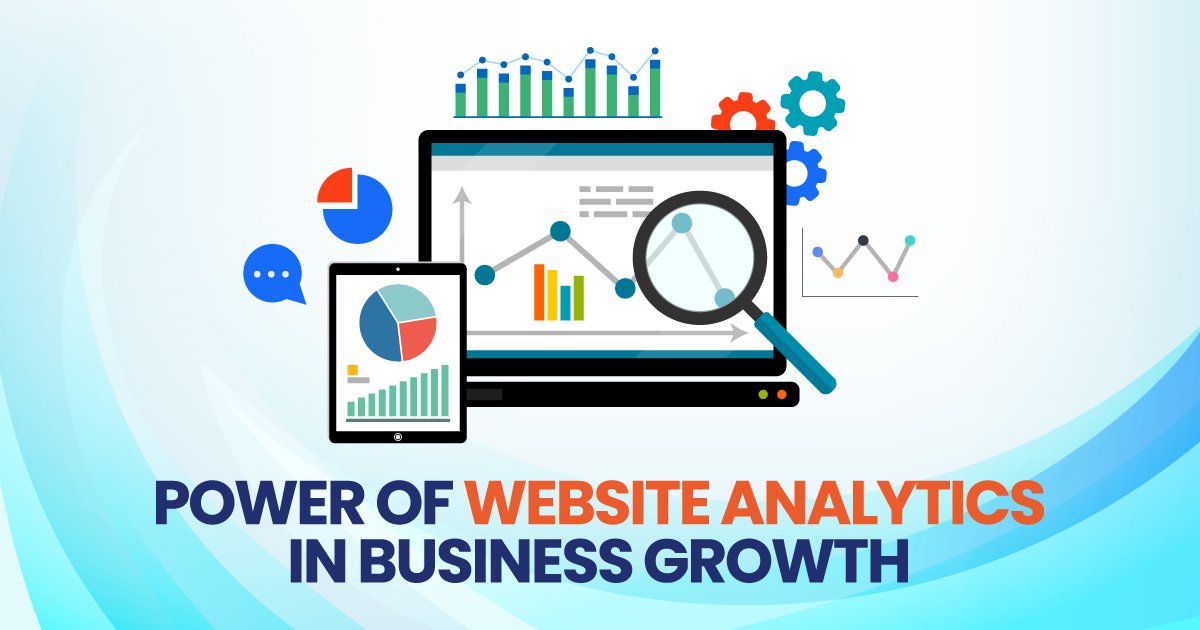

6 Reasons Why Website Analytics Are Crucial for Your Small Business

As a small business owner, you have lots of tasks to handle, like making products and doing marketing. It’s easy to forget about website analytics, but they are important. They give you helpful information to make smart choices and help your business grow.

In this blog, we’ll talk about how website analytics can help your small business grow. We’ll give you tips on how to get started and show you how tracking important numbers can help your business get bigger.

What Are Website Analytics?

Website analytics is about collecting and studying data from your site. With tools like Google Analytics, you can see who visits your site, which pages they check out, how long they stay, and where they’re coming from. It’s like a GPS for your site that helps you make smart choices to improve your online presence.

Website Analytics

If you want to grow your small business, website analytics can help. They show you how to make your website design and marketing better. Analytics help you understand your audience, so you can make your content better and increase the number of people who take action on your site. This is important for succeeding in the online world.

Top Website Analytics Tools for Small Businesses

Google Analytics is a popular tool that helps you check website stats. It’s free and gives detailed reports. Some people think it’s a bit hard to use. For WordPress users, MonsterInsights is a great option. This plugin makes Google Analytics easier and shows simple reports right in your WordPress dashboard.

Here are some other tools you might consider:

  • Hotjar: Understand how users interact with your website effortlessly. It shows heatmaps to see where users click and scroll. You can watch session recordings to see their actions. Your website conversion rate is shown easily. Feedback polls let you know what they think. These tools give you important insights into user behaviour.
  • Crazy Egg: Discover how users interact with your website. It shows heatmaps to know where users click. You can do A/B testing to try out different designs. It also lets you watch session recordings to see what users do. This is great for making your site better and getting more people to take action.
  • SEMrush: SEMrush is a tool that helps with SEO, which means making your site show up in search results. It gives you detailed info on website traffic and lets you check out what your competitors are doing. This helps you make your site more visible to people searching online.

6 Key Ways Website Analytics Can Help Your Small Business

Website analytics are super helpful for growing your small business. They let you see how visitors use your site, showing what’s good and what needs fixing. With this information, you can make smart choices to improve your online presence. These are six key ways analytics can drive your business growth:

1. Understand Your Audience

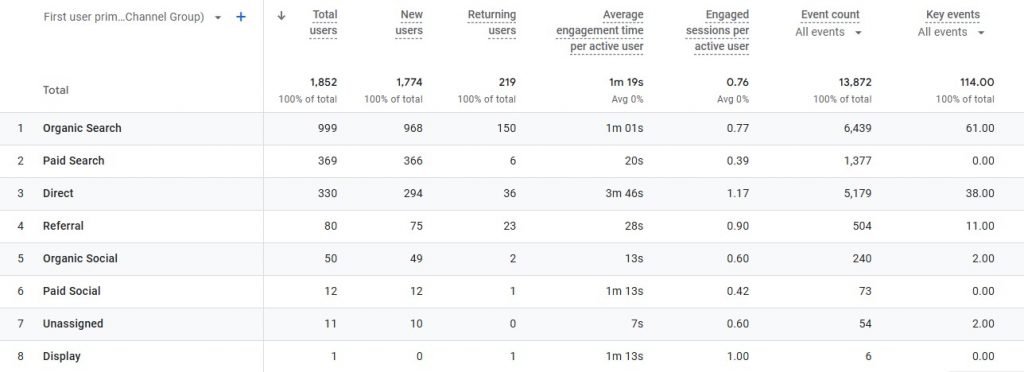
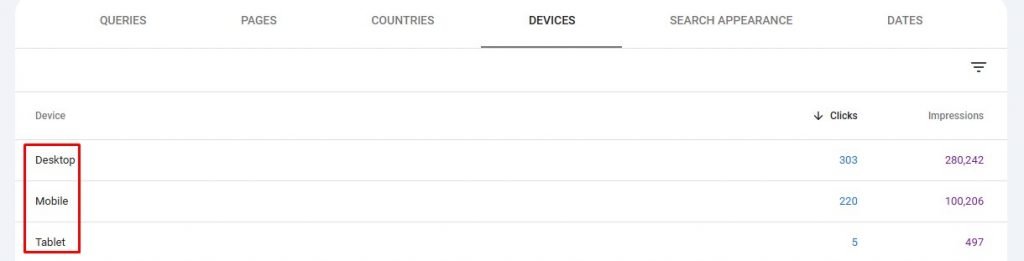
Use website tools to learn about your visitors. Find out where they live, how old they are, and what they like. See what devices they use to visit your site. Use this info to make messages that fit them. This can help you sell more.

For example, Google Analytics User reports show who visits your site. This helps you know more about them. With this info, you can change your site to fit what they like and need.

Website Analytics Engagement

Tips: 

  • Use reports to understand your audience
  • Design for mobile users
  • Make informed design choices

2. Improve Website Performance

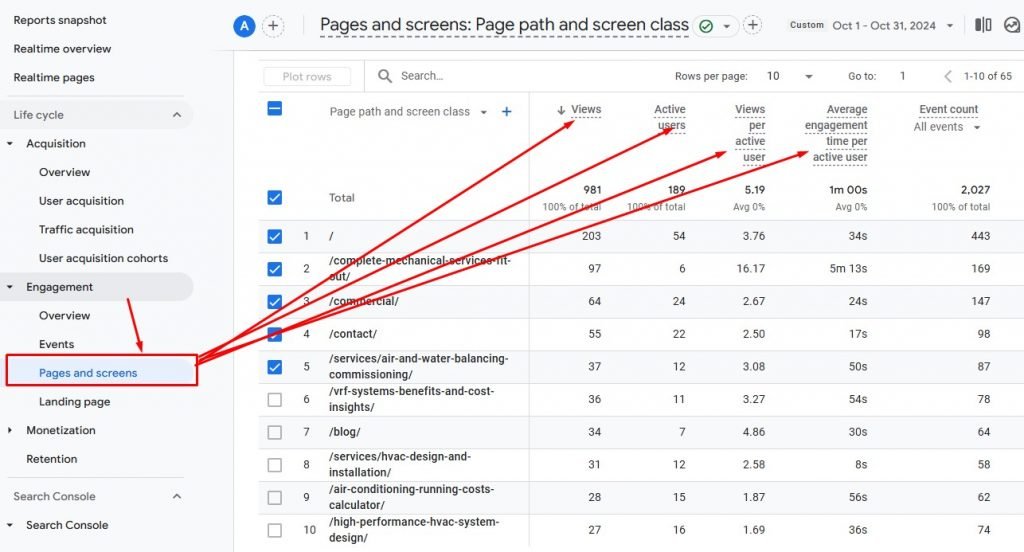
Performance is everything. Slow-loading pages, high bounce rates, and broken links can turn potential customers away. Analytics can help you identify problem areas so you can take action before they affect your bottom line.

Google Analytics shows important numbers like how long people stay and how many leave quickly. This helps find what needs fixing. MonsterInsights gives a report on site speed to spot slow pages. Fixing these can make your site better and help you sell more.

Page Screen Times

Tips: 

  • Check website speed regularly
  • Fix slow-loading pages
  • Compress images
  • Faster websites drive sales

3. Track Marketing Campaigns Effectively

You can use website tools to see which ads bring the most people and sales. It helps you know where to spend money best. Whether you use email, social media, or ads, this info shows what works. Spend your money on the best ones.

Use UTM codes for your marketing campaigns to see how well each one is doing. Check your campaign data in Google Analytics to find out the return on investment (ROI). MonsterInsights makes it easy to view campaign reports right from your dashboard.

Tips: 

  • Focus on high-performing channel
  • Invest wisely
  • Optimise your marketing strategy

4. Improve Your SEO Strategies

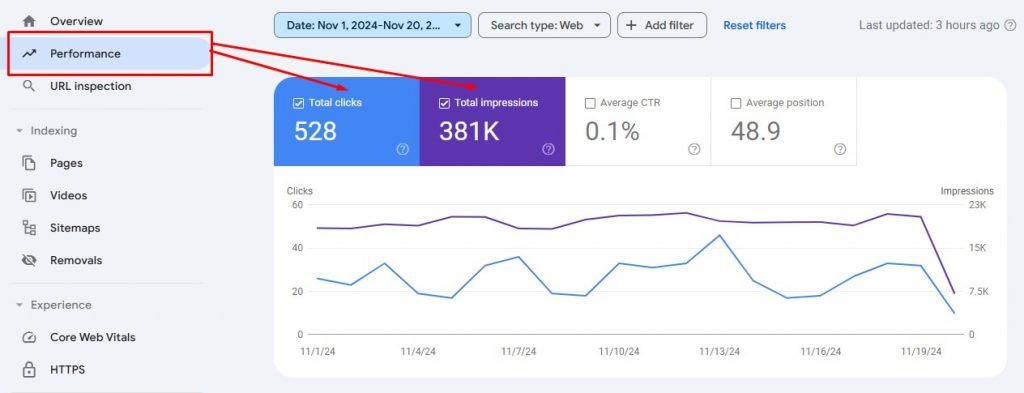
Website analytics are great for improving local SEO. They help you see which keywords and search terms bring visitors to your site. You can then adjust your SEO plan. Tools like Google Search Console shows which pages do well and which keywords bring people to your site. By using these top keywords in your content, you can improve your search rankings.

Google Console Impressions

Tip: 

  • Analyse popular topics
  • Create more relevant content
  • Update your website design
  • Ensure easy navigation

5. Measure ROI

Checking return on investment (ROI) is important for small businesses. Website analytics help you see how well your marketing is working. This lets you find out which ways of marketing make the most money. Google Analytics can track how much money you make from your ads.

If you have an online store, you can use Google Analytics to track sales, money made, and how many people buy from you. With MonsterInsights, it’s easy to set up tracking, and you can see your sales info right from your WordPress dashboard.

Search Console Devices

Tips: 

  • Track ROI
  • Evaluate ad performance
  • Adjust your strategy
  • Maximise marketing budget

6. Make Data-Driven Growth Decisions

The best thing about website analytics is that they help you make smart choices. Instead of guessing, you can use real data to decide what to do. For example, you might see more people visiting from a certain area or notice some products selling really well. This information helps you change your plans and put money into what works best.

If you see a lot of people visiting a product page but not buying, it’s time to make changes. Try fixing the website design or adding better calls to action to encourage people to buy.

Tips: 

  • Analyse website data
  • Identify underperforming sections
  • Test new content or design
  • Increase engagement 
Result Website Analytics

Conclusion

Website analytics are very important for small businesses. They help you understand who visits your site and how to make it better. By using this information, you can make smart choices to help your business grow. You can also improve your marketing and get more people to buy from you.

Using tools like Google Analytics and Hotjar helps you see important numbers about your website. You can see if your ads are working, make your website show up better in searches, and learn how to make your site work better. This information helps you make smart choices to help your business grow in the online world.

Creating a website for a small business isn’t just about making it look nice. It’s important to design a site that helps your customers and makes their visit easy from start to finish. Use website tools to see how people use your site. This will help you make smart choices to improve the website. When you do this, you can turn visitors into happy customers who keep coming back.

8 Essential Elements for Designing the Perfect Website for Business

Are you a business looking to create a website that helps you connect with your audience and showcase your services? A well-designed website is key to attracting clients and making sure your business stands out online. But what exactly makes a “perfect” website for you?

Here’s a simple guide to help you create an effective, user-friendly website that drives results. Let’s dive into the 7 essential elements every website should have!

1. Clear and Easy Navigation

Organise your business website design so it’s easy to use. Put similar information together. Use simple menus and clear labels. This makes it easier for visitors to locate the information they need without hassle. Keep navigation simple and clear. Use menus that are easy to understand. This helps people find information quickly and easily. Avoid using confusing words. Common menu items should include Home, About, Services, and Contact.

  • Our Services
  • About Us
  • Contact Us

Help visitors find information on your website easily. Keep things simple and clear. Use easy-to-understand menus and labels. This will let people find what they need quickly. Keep navigation simple and clear. Use menus that are easy to understand. This helps people find information quickly and easily. Consider adding a search bar to help users quickly find specific info. Consistent navigation across all pages is key for a smooth experience.

2. Compelling, Clear Content

Your content should be engaging and easy to understand. Focus on:

  • Clear, concise language
  • Make your text easy to read by keeping paragraphs short. Break up long paragraphs into smaller parts. This helps people read and understand better.
  • Use headings to organise your text into sections. Bullet points can highlight important details.
  • Add images to show your ideas and make the page look nice. This helps visitors quickly find the info they need.
  • Offering valuable resources like blog posts, FAQs, or case studies

When writing for websites, focus on what your audience needs. Show that you understand and care about the challenges people with disabilities face. Use words that are important for search engines to help people find your site easily. Make sure your language is simple and your tone is friendly.

3. Strong Calls-to-Action (CTAs)

Encourage visitors to interact with your website using clear calls-to-action (CTAs). These are simple prompts like “Contact Us,” “Book a Consultation,” or “Learn More.” Make sure they are easy to see and click. Place them in smart spots on your site to get more people to take action. Use phrases like “Get Started,” “Book a Consultation,” or “Request More Information.” 

Book a Free Session

Make sure these CTAs are easy to find on your site. Put them on the homepage, in blog posts, and at the end of service pages. They should stand out and be easy to click.

4. Mobile Responsiveness

With so many people browsing the web on their phones, it’s essential that your website works well on mobile. Choose a responsive design that adjusts automatically to any screen size. 

Website Mobile Responsiveness

You need to ensure your website functions smoothly across all devices. Test it on phones, tablets, and computers. This helps everyone have a smooth and easy experience.

5. Accessibility Features

Making your website accessible to everyone, including people with disabilities, is a must. Implement features like:

  • Use descriptive text for images so everyone can access them. This text is called alt text. It tells people with visual impairments what the image is about. Alt text should explain what the image shows and why it’s important. Keep it simple and clear.
  • Keyboard navigation for those unable to use a mouse
  • Colour contrast for those with visual impairments

Following the Web Content Accessibility Guidelines (WCAG) helps your site meet important standards. It’s not just about rules; it’s about making your site usable for everyone. These guidelines make your website friendly and open to all people, including those with disabilities. Being inclusive means more people can enjoy your online content.

6. Social Proof and Testimonials

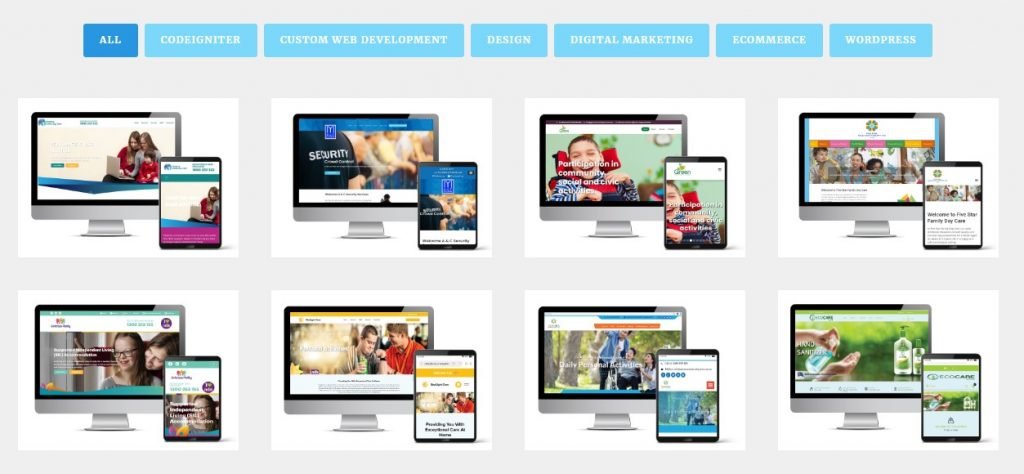
Trust is super important, especially for your business website. Make sure people feel confident that you will take good care of them. Show them you are reliable and trustworthy. Keep your promises and support them when they need help. This makes them feel safe and valued. You can show that your services really work by sharing testimonials or portfolios from your clients. These are real stories and feedback from people who have used your services. When others see these positive stories, it helps them feel confident in choosing you.

Portfolio of Client

It’s also a great idea to show any certificates or awards your business has earned. These achievements prove that you do a great job and meet high standards. Make sure to put them on your website so everyone can see them!

As your business grows, try to collect more testimonials. Ask clients if they would be willing to share how your services helped them. The more stories you have, the more trust you will build with new clients. Remember, keeping things real and honest is the best way to show you care and are committed to helping others.

7. Easy-to-Find Contact Information

An easy-to-find contact information will help the customers to reach your service. Display your contact information prominently so it’s easy for visitors to find and reach out to you. Make sure potential clients can find this information quickly. Include a dedicated contact page with:

  • Your phone number
  • Email address
  • Physical address
  • A contact form

Include links to your social media profiles on your website to provide visitors with additional ways to connect with you. This lets visitors connect with you in different ways. Make it easy for them to find and click these links.

8. Avoid Generic Stock Photos

Generic stock images can feel disconnected and impersonal. Use authentic photos of your team, clients (with permission) and your workspace. Real images create trust and make your website feel more authentic. If you must use stock photos, pick ones that feel real and relevant to your audience.

Additional Tips:

  • Consistency is Key: Make sure your website looks the same on every page and says the same things. This helps people trust your site and makes it easy for them to use. Keeping everything consistent makes visitors feel comfortable and happy.
  • Speed Matters: Make sure your website loads fast so visitors stay on your page. Speed up your site by making images smaller and using fewer plugins. This helps keep people interested and happy.
  • Regular Updates: Keep your website interesting by adding new blog posts often. Also, update your services page to show the latest information. This ensures visitors stay engaged and well-informed.

How to Find the Best Website Design Agency?

Choosing the right website design agency is crucial for your success. Here’s how you can find the best team to build your perfect website:

  • Look for experience with accessibility: Websites need to be easy for everyone to use. It’s important to pick an agency that knows the rules about making sites accessible. They should follow the best ways to help all users enjoy the website.
  • Check for a portfolio of excellent work: Look for a website design company that shows off great examples of their work. Make sure they can create sites that are easy to use and look nice. A good portfolio means they know how to make websites that people will enjoy using.
  • Read reviews and testimonials: When picking an agency, choose one with a history of doing a good job. Look for companies with lots of happy clients and positive reviews. This means they know how to make their customers satisfied.
  • Understand their process: A good agency will learn about your goals and who you want to reach, not just what you like in a design. Make sure they work with you and are open about how they do things. Working together is important!
  • Look for local agencies: When picking a website design firm in Sydney, look for local experts. They know the area and can give you personal help. Find a team that understands what you need and can make your site great.

Summing It Up

A great business website should be user-friendly and visually appealing. It needs clear menus so people can find things easily. The site should also work well on phones and tablets. Make sure it has strong buttons to click, is easy to read for everyone, and shows good reviews. Don’t forget to make it simple for people to contact you.

When picking a website design agency, choose one that understands your ideas. A good agency will help make your site useful and attractive. Look for website design experts who can make your site awesome and work well.

Good luck designing your website!