
How to Create An Effective 404 Page?

A “404 page not found” is the digital equivalent of hitting a dead-end, but it doesn’t have to be a bad experience. Instead of leaving users frustrated, your 404 page can be an opportunity to engage them in a creative way.

Often, 404 pages are simply overlooked, and users face a sudden stop without any guidance. However, with a custom 404 page design, you can make the most out of this moment, turning it into a positive interaction that keeps users on your site.

Curious about how to improve your 404 page? Check out some innovative 404 page ideas from leading brands like Wix Studio, Airbnb and Lego. But first, let’s quickly explore what a 404 page is and why its design matters.

So, What is a 404 page?

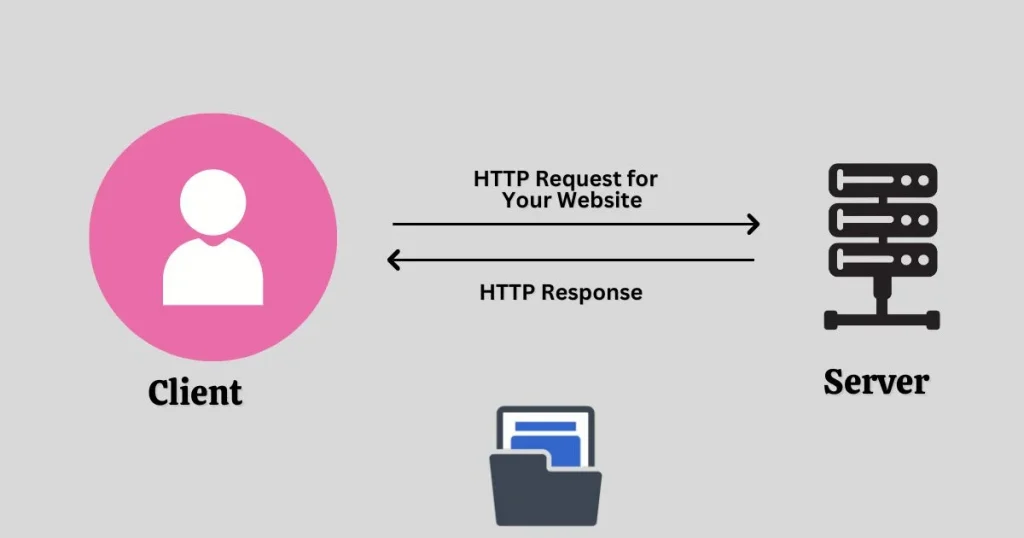
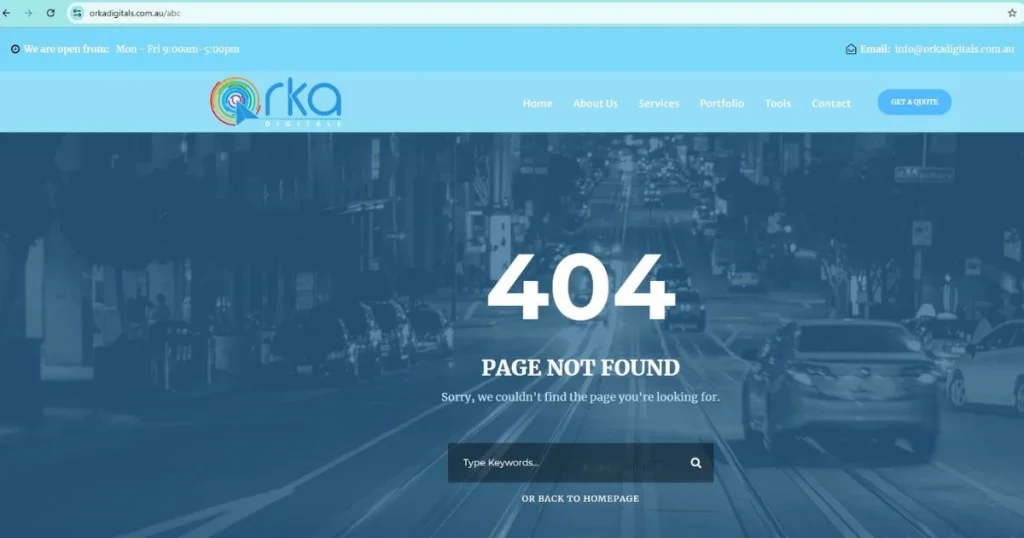
A 404 page appears when a user tries to access a page that no longer exists or can’t be found. Essentially, it’s an error message sent by the server when the requested page is missing. This can happen for a few reasons:

  • The content may have been removed from the site, but the old link still appears in search results.
  • A link might be broken due to a typo or an outdated URL.
  • Sometimes, the user may have typed the URL incorrectly.

404 page

To prevent confusion, it’s important to keep URLs clear and simple or offer tools like a QR code to help users find what they’re looking for quickly. This is also a good opportunity to think about your custom 404 page design and how it can redirect users back to valuable content.

Top Tips for Creating Effective 404 Pages

A 404 page is often the first sign that something went wrong on a website, but it doesn’t have to be a dead end for your users. With the right design, a 404 page can be transformed from a frustrating experience into an opportunity to engage visitors and guide them back to useful content. Whether it’s through humour, creativity, or smart navigation, a well-designed 404 page can leave a lasting impression and help maintain a positive user experience. In this guide, we’ll share top tips for creating an effective 404 page that not only addresses the error but also keeps your audience engaged and on track:

1. Stick to Minimalist Design Principles

The main goal of a 404 page is to clearly guide users on what to do next when they land on an error page. A complex design can confuse and distract visitors. To avoid this, keep the design simple and focused, reducing unnecessary details. For example, Dropbox’s custom 404 page uses a clean, minimalist design with a helpful message and clear links to the homepage and other useful areas of the site. 
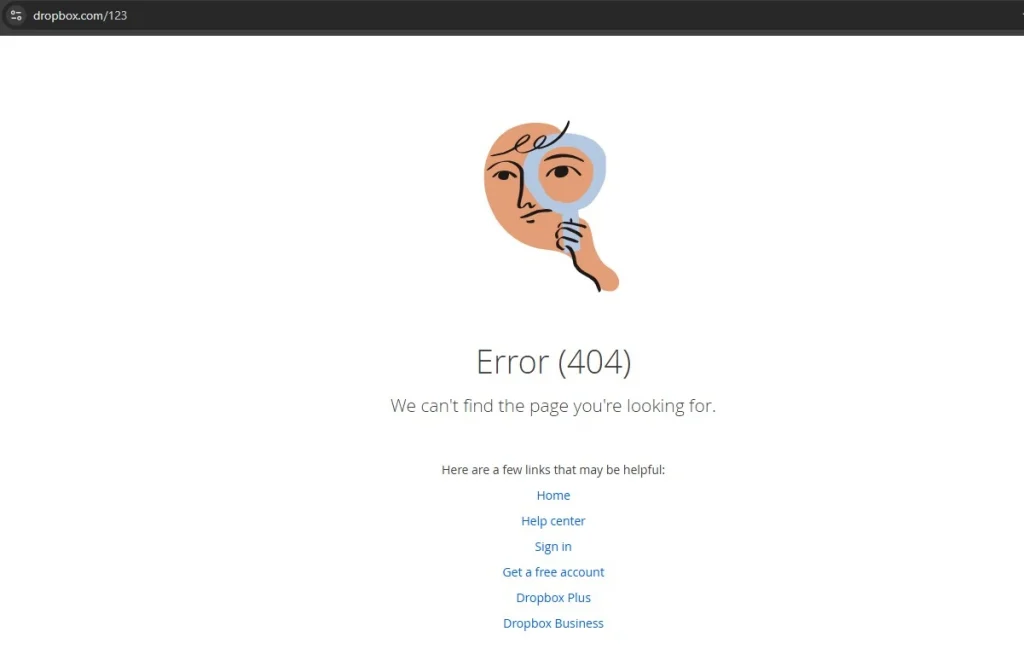
Stick to Minimalist Design Principles

This ensures users can quickly get back on track without feeling frustrated. A thoughtful 404 page design helps maintain a positive user experience, even when something goes wrong.

2. Clearly Explain What Went Wrong

The worst thing you can do with a 404 page is to leave users without any explanation. Instead of just displaying an error message, turn the situation into an opportunity to guide them. According to Jakob Nielsen’s guidelines, website designs should help users understand the issue and offer a way to recover from it.
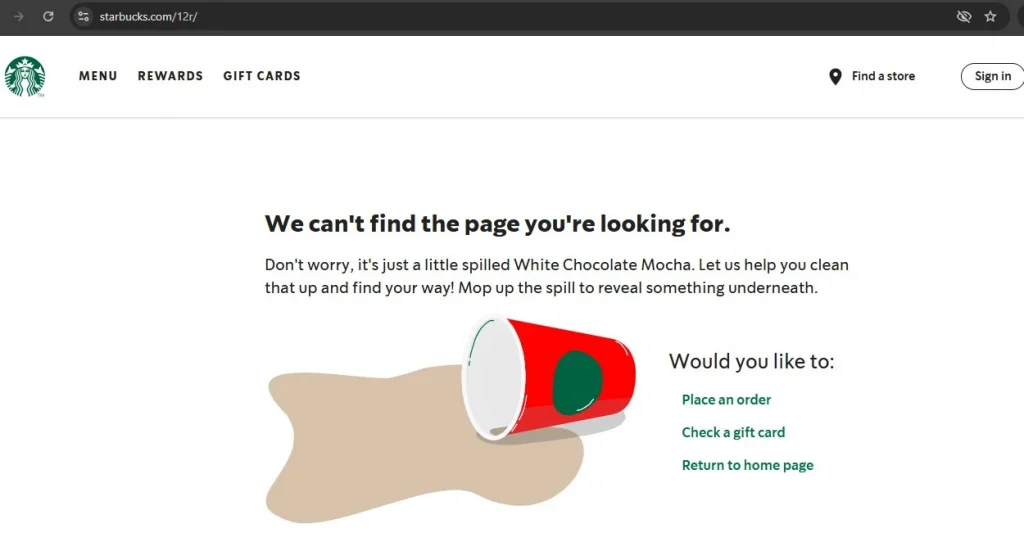
Clearly explain what went wrong

For example: Starbucks has a special 404 page that appears when a page can’t be found. It gives a simple, friendly message to explain what happened. It also offers easy choices to go back to the homepage or look at their menu. This helps users understand the mistake and find what they need. Using simple words instead of hard technical terms makes it easier for everyone to understand, especially people new to English or technology.

3. Keep The Content Simple And Concise

On the web, people tend to scan content rather than read it fully, so it’s important to keep things brief on a 404 page. Avoid long blocks of text, and instead focus on making every word count. A great 404 page design should quickly convey the message and offer a simple way to move forward. For example, the 404 page on Airbnb uses minimal text with a clear, simple message and a prominent call-to-action button that directs users back to the homepage. This approach keeps the experience straightforward, helping users get back on track with minimal hassle.
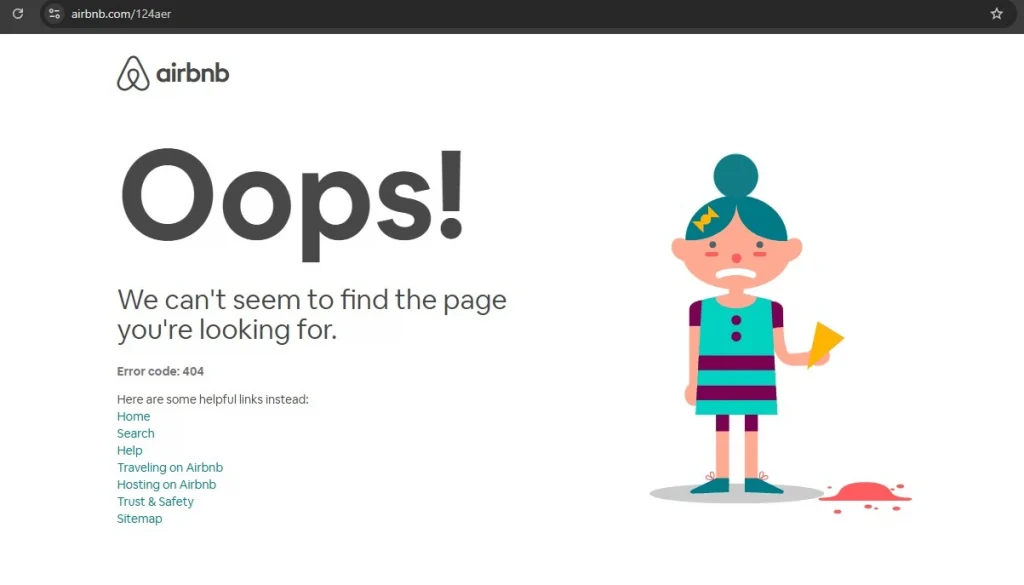
Keep The Content Simple And Concise

4. Add a touch of humour

Laughter can help lighten the mood, so consider adding a bit of humour to your 404 page. Errors can be frustrating, but a well-timed joke or light-hearted comment can ease the frustration and create a more enjoyable experience.

It’s important to know who you’re talking to. Make sure the jokes match your brand’s style and personality. A funny pun can make people smile, but a bad joke might not work, especially if they need help or want a serious experience.

Be careful not to use jokes that might upset or exclude people. Everyone has different ideas of what’s funny. It’s best to avoid jokes about culture, identity, or values that could hurt someone’s feelings.

A key tip: Write simple and clear text for your 404 page. You don’t need fancy pictures—good writing and helpful links are enough. Make sure your words match your brand’s style and speak to your audience. Use short sentences and easy words. Avoid being too formal. Active voice makes your message more engaging, but you can use passive voice to explain technical problems.

5. Put thought into the copy

A 404 page is a great opportunity to infuse some personality into your site. Rather than a dull message like “404: Page Not Found,” consider using a more casual, friendly tone, like “Whoops! This page seems to have vanished.” For example, a popular travel website might use, “404. It seems this page has gone off track!” and pair it with a fun map graphic.

Put thought into the copy

Using creativity and some humour can make an error page less annoying. It also helps create a good experience that matches your brand’s personality.

6. Use Relevant Visuals

A good 404 page can keep visitors from feeling frustrated, even if it’s their first time on your site. Simple pictures and creative text can show off your brand and help fix the problem.

If you’re unsure about what kind of visuals to use or want to avoid a page that feels too out of place, a simple design with straightforward text and useful links can still work wonders. For example, a clean page with a helpful message and a button leading back to the homepage or popular sections ensures users can quickly get back on track, while still reflecting your brand’s professionalism.

7. Direct Users to Your Best Content

While many see a 404 error as a dead-end, it can actually be an opportunity to introduce users to more of your site. Instead of letting them leave, offer a selection of helpful links to your best content, encouraging them to explore further. Without these links, users are less likely to keep browsing.

Not sure which links to include? A good idea is to check the URL for any typos and suggest similar pages that might match what the user was looking for. For example, if someone types in a misspelt URL, you can display a list of related pages, guiding them toward useful content and keeping them engaged.

8. Make The Call-to-Action Stand Out

A 404 page can make your website better for visitors. Use a fun picture, explain the error clearly, and add a big button to help people find their way. This can turn frustration into something good.

Make the call to action stand out

While the design of your error page is important, the functionality is what truly matters. If you’re unsure what links to offer, focus on providing a simple solution: a clear CTA that takes users back to the homepage. For example, a straightforward “Go Back Home” button can help users easily navigate away from the error page and keep them engaged with your website.

9. Include a Search Function

Good user experience (UX) is all about anticipating what users need and making their journey as smooth as possible. When users land on your 404 page, give them a search option so they can try to find what they were looking for. This not only helps them get back on track but might also encourage them to explore parts of your site they hadn’t planned on visiting.
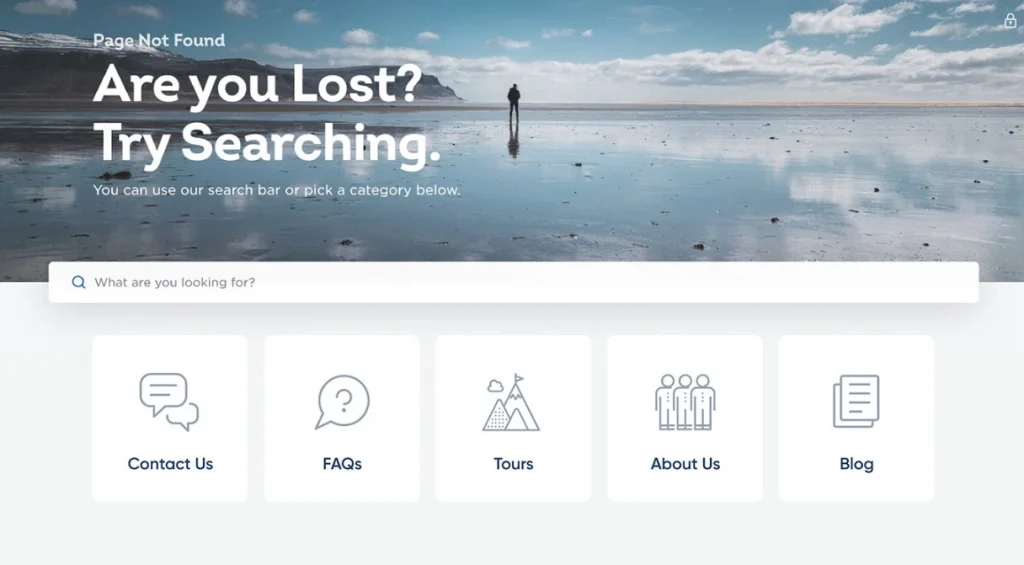
Include a search function

Pro Tip: Allow users to report errors, but make it optional. This way, they can help you improve the site without feeling pressured. For example, Spotify offers users the chance to search for what they need on the 404 page, while keeping the process simple and welcoming.

10. Stay True to Your Brand Identity

A 404 page might seem like an outlier, but it should still align with your website’s overall look and feel. When done right, it can actually help improve usability and boost conversions. Make sure that any illustrations on the page match your brand, the language reflects your tone, and the font and colours stay consistent with the rest of your site.
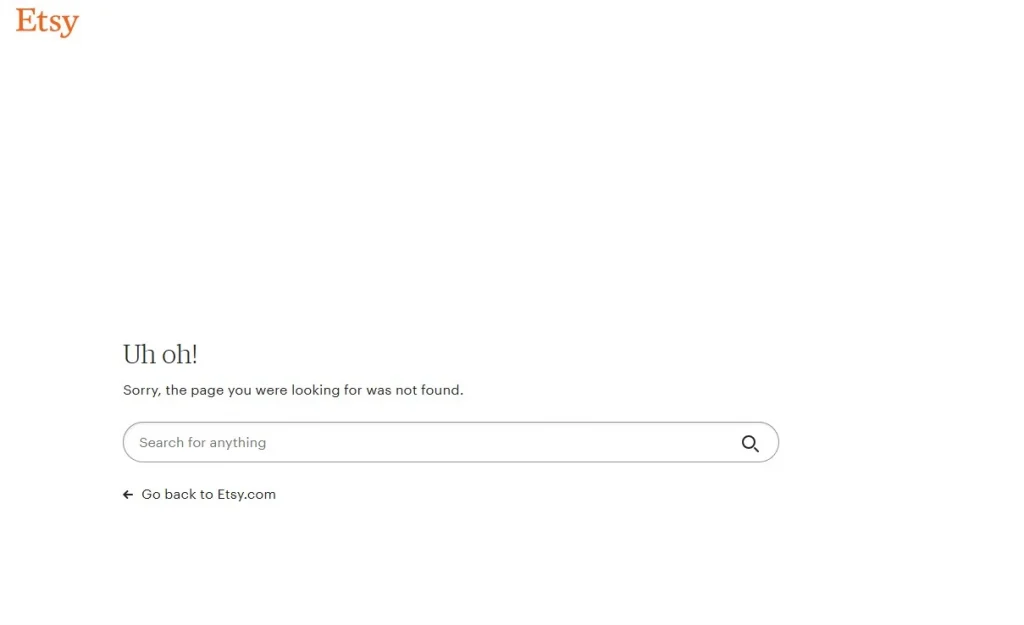
Stay true to your brand identity

Even if the 404 page functions properly, it can feel disconnected from your brand if it doesn’t match the design of the rest of your site. This could be a missed chance to keep users engaged and guide them back to exploring your product. For example, Etsy ensures that their 404 page has a similar design and tone to the rest of the site, making it feel like a seamless part of the user experience.

11. Avoid Unnecessary Clutter

Simplicity is key when designing a 404 page. While it can be tricky, keeping things simple can save users from frustration and confusion. If you’re unsure about what to include, a brief apology and a search bar can go a long way in helping users get back on track.

It’s important not to leave users stranded without an option to move forward, but bombarding them with too many links is just as unhelpful. Following the idea of minimalistic design, unnecessary information can clutter the page and confuse users. As a general rule, less is more. For instance, Shopify keeps their 404 page clean and simple with a short apology, a helpful search bar, and a clear button to return to the homepage, ensuring a seamless experience for users.

12. Don’t Overdo It

A basic, unremarkable 404 page often leaves users feeling disappointed and abandoned. However, adding a mismatched illustration or an awkward joke can make things even worse. The key is moderation—this applies to error pages too. Overloading your page with too much information can overwhelm users and increase their cognitive load. Keep it simple and focused to make sure the page serves its purpose without causing frustration. For instance, Twitter uses a straightforward design for its 404 page, with minimal text and an easy path back to the home page, ensuring a seamless user experience.

13. Include Interactive Elements

We all have a playful side that enjoys a bit of fun when we’re bored, so why not use your 404 page to entertain users and keep them engaged?

Include Interactive Elements

An excellent example of this is Pixar’s creative 404 page. It features a random selection of fun, animated characters and playful messages, making it a delightful distraction. The page also includes a search bar, turning it into an interactive experience that encourages users to explore more of the site. By adding this extra layer of engagement, the 404 page becomes more than just an error—it becomes an enjoyable part of the website.

Key Elements of an Effective 404 Page

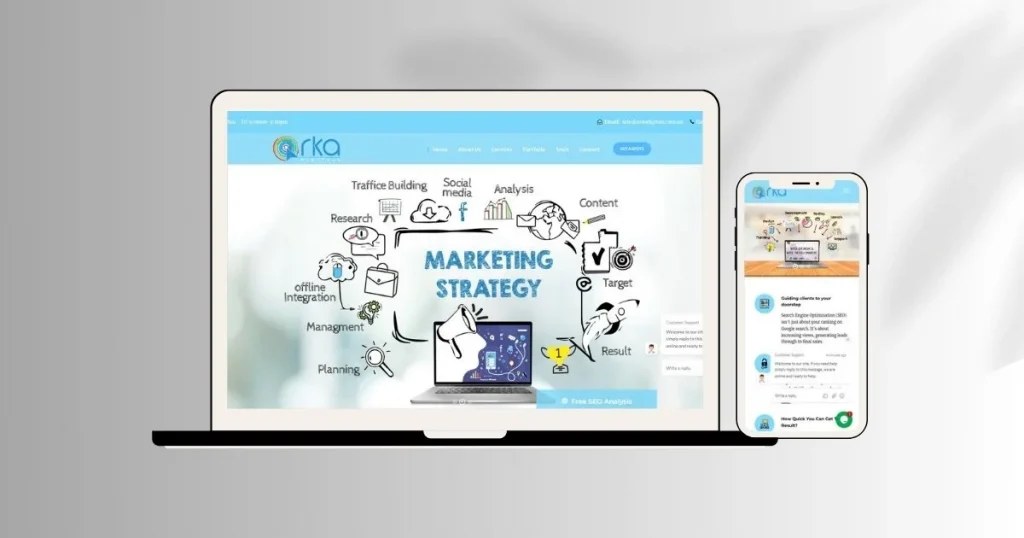
So, what should your 404 page include? While your 404 page design should follow the best practices of responsive web design, there are a few key elements that stand out:

  • Consistent navigation and branding: Your 404 page should align with the rest of your website in terms of design. Use your logo, brand colours, and ensure the page includes the same top navigation and footer as the rest of your site.
  • Accessibility: Just like the rest of your website, the page must follow accessibility best practices, ensuring it’s usable by everyone, including those with disabilities.
  • Clear error message: While creativity is welcome, it’s essential that the error message is immediately visible and unmistakably states that it’s a 404 error page.
  • Suggested actions: Since this isn’t the page users intended to visit, it’s important to guide them back to the right place it effects your SEO too. Offer at least one actionable option, like a link to the homepage or a search bar to help them find what they’re looking for.
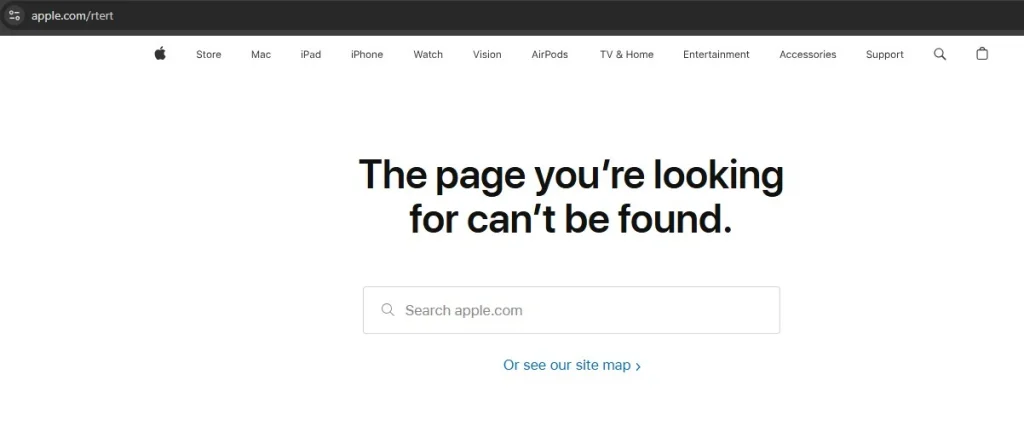
Key Elements of an Effective 404 Page

For example, Apple uses a simple, clear message along with a “Go back to Home” link, helping users quickly navigate their way around the site.

The Advantages of Designing a Custom 404 Page

While we can hope for a world without web development errors, every web design should include a well-thought-out 404 page. This is your chance to create something unique and turn a frustrating moment into a positive experience. Here are a few reasons why customising your 404 page is worth it:

  • Improved user experience: A good page doesn’t leave visitors stranded—it helps them find their way. For example, offering links to popular pages can help guide them to content that interests them.
  • Visual appeal: A well-designed 404 page can make a lasting impression. Studies show that users are more forgiving of small usability issues when the page is visually attractive.
  • Marketing opportunities: A creative 404 page can reinforce your brand and enhance its image. A thoughtfully designed error page can guide users to take the right next step, potentially turning a frustrating experience into a conversion opportunity.

Advantages of Designing a Custom 404 Page

For example, Mailchimp uses a playful and on-brand 404 page, featuring helpful links and a touch of humor, which reinforces the brand’s personality and keeps users engaged.

To Conclude

Making a good 404 page is about turning a problem into a chance to connect with visitors. A fun and helpful 404 page should show your brand’s style, help people find useful content, and make it feel less like a mistake. Use clear words, simple navigation, and nice visuals to keep users happy. This helps keep visitors on your site for longer. Whether it’s a funny design or a simple one, make sure it fits your website’s look and goals.

A smartly designed 404 page can make visitors happier, boost sales, and make your brand look better. Don’t forget about this small part of your site—it can have a big impact.
Maximise Website Loading Speed: Simple Techniques for Faster Pages

Website speed is very important for how well your site works. It affects how visitors use your site, how high your site ranks on search engines, and even how likely people are to become customers. A slow website can hurt your business in many ways – it can drive visitors away, lower your search engine ranking, and lead to fewer sales.

In this guide, we’ll explain why website speed matters and how you can make your site load faster. We’ll show you how to test website loading speed and give you easy tips to optimise website loading speed. By following these steps, you can make sure your visitors have a fast and smooth experience on your website.

Why Website Speed is Important

Before we talk about how to improve your website speed, it’s helpful to understand why it’s so important. Faster websites make users happy and lead to better results. On the other hand, slow websites can drive visitors away and hurt your search engine ranking and conversion rates. In this section, we’ll cover:

  • User Expectations: Visitors expect websites to load quickly, and delays can frustrate them, causing them to leave.
  • Search Engine Rankings: Google and other search engines favour fast websites, which can help your site rank higher.
  • Conversions: Website speed affects how likely visitors are to make purchases, sign up for services, or take action on your site.
  • Mobile Traffic: More people are browsing on mobile devices, so it’s important to make your website load quickly on phones and tablets.

Expected Website Speed 

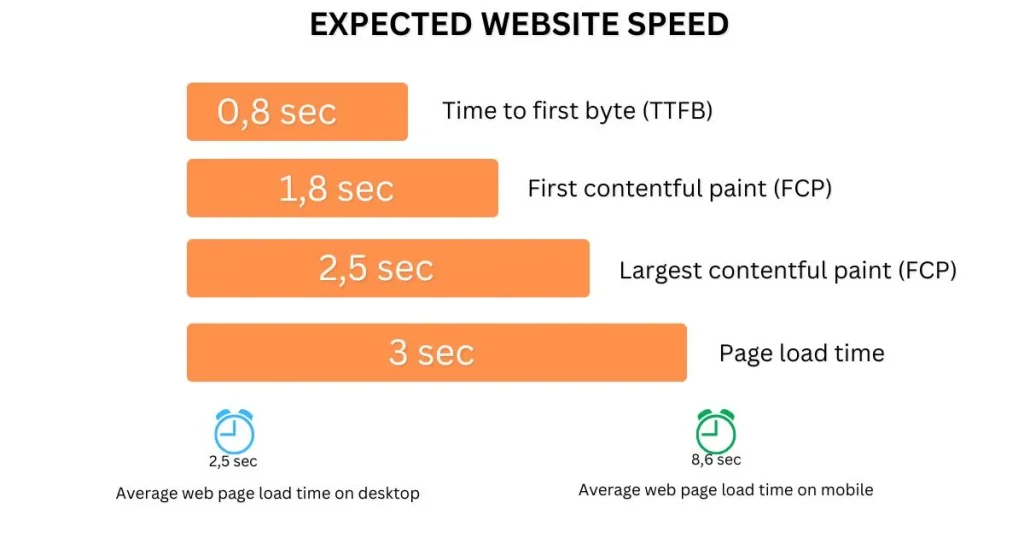
Website speed optimisation involves techniques to make your website load as quickly as possible. Some key measures of website speed are:

  • Time to First Byte (TTFB): How long it take for the server to send the first response?
  • First Contentful Paint (FCP): The time it takes for the first text or image to show up.
  • Largest Contentful Paint (LCP): How long it takes for the biggest element, like a large image or heading, to load.
  • Page Load Time: How long it takes for the entire page to fully load on the screen.

For a smooth user experience, aim for these targets:

  • TTFB: Under 0.8 seconds
  • FCP: Under 1.8 seconds
  • LCP: Under 2.5 seconds
  • Page Load Time: Under 3 seconds

Interestingly, a study of the top 100 websites found the average page load time was 2.5 seconds on desktop and 8.6 seconds on mobile.

What Affects Website Loading Speed?

Before we look at solutions, it’s important to understand the common factors that make websites slow. Here’s a quick rundown:

1. Large Images

High-resolution images can take up a lot of space, which means they take longer to load. When these files aren’t optimised, they slow down the entire website.

2. Unoptimised Code

Websites run on code, such as HTML, CSS, and JavaScript. If this code is messy or filled with unnecessary elements, it can bog down the site.

3. Server Response Time

Your web server is responsible for delivering your website to visitors. If the server is overloaded or poorly configured, it will take longer to respond to requests.

4. Too Many Plugins

For websites built with platforms like WordPress, plugins can extend functionality. However having too many or poorly coded plugins can slow everything down.

5. No Browser Caching

Browser caching lets visitors store parts of your website (like images or CSS files) on their local device. Without caching, these elements need to reload every time someone visits your site.

6. Excessive Redirects

Redirects take users from one URL to another. While they can be necessary, too many of them increase load times.

7. Ads and Third-Party Tools

Running ads or integrating third-party tools can lead to extra requests and scripts, adding load time to your pages.

How to Measure Your Website Speed

Before you can make your website load faster, you need to know how fast it loads right now. Measuring your site’s speed will help you understand what needs to be improved. There are many free tools you can use to check your website’s speed and see where it can be faster. Let’s take a look at some of the most popular ones:

Google PageSpeed Insights

Google’s PageSpeed Insights is a free tool that checks how fast your website loads. It gives you a score for both mobile and desktop versions of your site and provides suggestions on how to make it load faster.

GTmetrix

GTmetrix is another great tool that gives you a detailed report about your website’s speed. It shows how fast your site loads, how big the page is, and how many requests are made. GTmetrix also gives you tips on what you can do to make your website load faster.

Pingdom

Pingdom lets you check your website speed from different places around the world. It tells you how long it takes for your website to load, and what things (like images or scripts) are slowing it down. It also gives you suggestions on how to make your site faster.

WebPageTest

WebPageTest is a powerful tool that checks your site’s speed from different locations and browsers. It shows you exactly how long it takes for your site to load, and how long it takes to start loading (called Time to First Byte), and gives you details about how different parts of your website are performing.

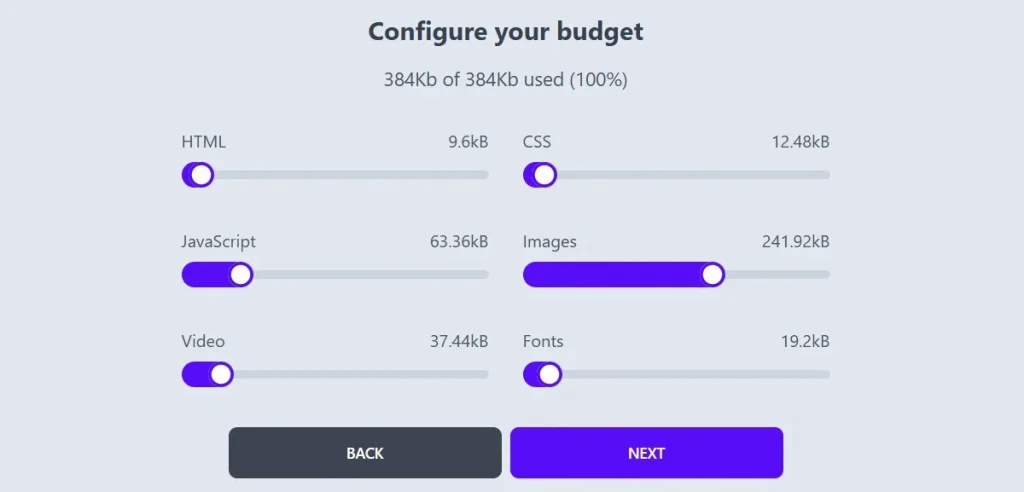
Performance Budget Calculator

The Performance Budget Calculator helps you set goals for how fast your website should load. A “performance budget” is like a limit or goal for how big your website can be and how many things (like images or files) it should load. Using this tool helps you make sure your website is not too slow.

Use the Performance Budget Calculator to set your budget. Source: Performance Budget Calculator.

How to Improve Website Performance

Website performance is critical to the success of any online business. A slow website can result in high bounce rates, lower user engagement, and a poor reputation. Fortunately, there are several strategies you can implement to optimise website loading speed. In this guide, we’ll walk you through 12 proven methods to optimise your site’s speed and enhance its overall performance.

1. Use a Content Delivery Network (CDN)

A Content Delivery Network (CDN) is a network of servers located in various locations around the world. Instead of loading your website from a single server, a CDN ensures that content is delivered from the server closest to the user, reducing the time it takes for the site to load. CDNs store cached copies of your site’s static files (like images, stylesheets, and JavaScript) on servers across the globe. When a user accesses your website, the CDN serves those files from the nearest server.

Why It Works:

  • Faster Load Times: The closer the server is to the user, the quicker it will load your website, helping to optimise Website Loading Speed.
  • Reduced Latency: By distributing content closer to your audience, CDNs reduce latency (delay in data transfer) and improve load times.
  • Improved Reliability: CDNs help prevent server overload by distributing traffic, ensuring that even if one server goes down, others can take over.

How to Set It Up:

  1. Choose a CDN provider like Cloudflare, Amazon CloudFront, or StackPath.
  2. Set up your website with the CDN by linking it to your hosting provider or configuring it through your CMS (like WordPress).
  3. After setup, the CDN will automatically serve cached versions of your website to users based on their location, further helping to optimise Website Loading Speed.

2. Move Your Website to a Better Host

Your website hosting provider plays a major role in how quickly your website loads. Shared hosting, while affordable, often leads to slower speeds due to limited resources and overcrowded servers. If your site is slow, consider upgrading to a better hosting option.

Why It Works:

  • Faster Server Resources: A better host, such as a Virtual Private Server (VPS) or dedicated server, ensures your website gets the resources it needs.
  • Improved Uptime: A high-quality host offers better reliability, reducing the chances of downtime, which can negatively affect performance.

How to Choose the Right Hosting:

  1. Look for hosts offering SSD (Solid State Drive) storage over HDD (Hard Disk Drive). SSDs are faster and more efficient.
  2. Choose VPS or dedicated hosting if you have high-traffic or resource-intensive sites.
  3. Look for managed hosting services that offer built-in optimisation and support to optimise Website Loading Speed.

3. Optimise the Size of Images on Your Website

Images are one of the most common culprits behind slow website load times. High-resolution images can be very large, slowing down your site. Optimising images ensures that they load faster without compromising quality.

Why It Works:

  • Reduced File Size: Optimising images reduces their file size, making them quicker to load.
  • Improved User Experience: Faster load times lead to a better user experience, especially on mobile devices.

How to Optimise Images:

  1. Use Image Compression: Tools like TinyPNG, ImageOptim, or Photoshop can reduce the size of your images while maintaining quality.
  2. Choose the Right File Format: Use JPEG for photographs and PNG for graphics with fewer colours. WebP is also a modern, efficient format supported by most browsers.
  3. Resize Images: Avoid uploading oversized images. Resize them to the maximum dimensions needed for your website to optimise Website Loading Speed.

4. Reduce the Number of Plugins

Plugins are great for adding functionality to your website, but too many can slow it down. Some plugins are poorly coded, and others may load unnecessary scripts and styles, adding to your page’s load time.

Why It Works:

  • Less Overhead: Fewer plugins mean fewer resources are used, which can help your website run faster.
  • Improved Site Stability: Reducing plugins minimises the chances of conflicts or bugs that could slow your site down.

How to Optimise Plugins:

  1. Audit Your Plugins: Regularly review your installed plugins and remove any that are unnecessary or redundant.
  2. Use Lightweight Plugins: Choose well-coded, lightweight plugins that don’t add unnecessary bloat to your website.
  3. Keep Plugins Updated: Ensure your plugins are always up-to-date to avoid compatibility issues.

5. Minimise the Number of JavaScript and CSS Files

Each JavaScript and CSS file your website loads adds extra time to the page load. The fewer these files, the faster your website will load. Minifying these files can also reduce their size and improve site performance.

Why It Works:

  • Fewer HTTP Requests: Minimising the number of JavaScript and CSS files reduces the number of HTTP requests, speeding up your site.
  • Smaller Files: Minification removes unnecessary spaces and characters in the code, reducing the size of the files and making them load faster.

How to Minify JavaScript and CSS:

  1. Combine Files: Merge multiple CSS and JavaScript files into a single file to reduce requests.
  2. Use a Minification Tool: Tools like UglifyJS (for JavaScript) or CSSNano (for CSS) can automatically minify your code.
  3. Leverage Browser Caching: Cache your minified files in the browser so users don’t need to reload them with every visit.

6. Use Website Caching

Caching stores a copy of your website on a user’s device, so they don’t have to load it from scratch every time they visit. This can significantly improve loading times for repeat visitors.

Use Website Caching

Why It Works:

  • Faster Load Times for Repeat Visitors: Cached pages load much faster because the browser doesn’t need to request all files from the server again.
  • Reduced Server Load: Caching reduces the strain on your server, as static content is delivered directly from the browser’s cache.

How to Set Up Caching:

  1. Use a Caching Plugin (For CMS like WordPress): Plugins like W3 Total Cache or WP Super Cache allow you to easily enable caching on your site.
  2. Set Expiry Dates: Use proper cache expiry headers to tell browsers how long to store content.
  3. Enable Object Caching: Object caching stores dynamic content (like database queries) to reduce server processing time.

7. Implement GZIP Compression

GZIP compression reduces the size of your website’s files, speeding up the process of transferring them from your server to the user’s browser. It’s supported by most modern browsers and can have a significant impact on load times, contributing to optimising Website Loading Speed.

Why It Works:

  • Smaller File Sizes: GZIP compresses files, reducing their size by up to 70%, which leads to faster downloads.
  • Reduced Bandwidth Usage: Since files are smaller, your website will use less bandwidth, saving you on hosting costs.

How to Implement GZIP Compression:

  1. Enable GZIP on Your Server: Most servers support GZIP compression by default, but you can check and enable it via your server’s .htaccess file or by contacting your hosting provider.
  2. Use a Plugin (For CMS like WordPress): WordPress users can use plugins like W3 Total Cache or WP Rocket to enable GZIP compression.

8. Optimise a Database in CMS

If you’re using a CMS like WordPress, your website relies on a database to store content and settings. Over time, databases can become bloated with outdated information, slowing down your site.

Why It Works:

  • Faster Queries: A clean and optimised database allows your site to retrieve data faster, reducing load times.
  • Better Performance: Optimising your database can also reduce server load and improve overall site performance.

How to Optimise Your Database:

  1. Use a Database Optimisation Plugin: WordPress users can use plugins like WP-Optimise or WP-Sweep to clean up and optimise their database.
  2. Remove Unnecessary Data: Delete old post revisions, trashed posts, and unused tables.
  3. Schedule Regular Database Optimisations: Set up automatic cleanups to optimise your database regularly.

9. Reduce the Use of Web Fonts

Web fonts are often used for custom typography, but each web font you use adds extra HTTP requests, which can slow down your website. Reducing the number of web fonts can improve your site’s speed.

Why It Works:

  • Fewer HTTP Requests: Reducing the number of web fonts reduces the number of requests the browser needs to make, speeding up the page load.
  • Smaller File Sizes: Some web fonts are quite large, and minimising their use can reduce page weight.

How to Use Web Fonts Efficiently:

  1. Limit the Number of Fonts: Use one or two fonts across your website instead of multiple font families.
  2. Use System Fonts: Consider using system fonts (like Arial or Times New Roman) instead of web fonts, which don’t require additional requests.
  3. Use Font Subsetting: Only load the characters your website needs, rather than the entire font set.

10. Detect 404 Errors

404 errors (page not found) can lead to a poor user experience and increased load times. Broken links not only frustrate visitors but also negatively impact your SEO.

Why It Works:

  • Improved User Experience: Fixing broken links helps users navigate your site without encountering frustrating error messages.
  • SEO Benefits: Eliminating 404 errors improves the search engine crawlability of your site.

How to Detect and Fix 404 Errors:

  1. Use a Broken Link Checker: Tools like Screaming Frog or Google Search Console can help you identify 404 errors.
  2. Redirect Broken Links: Use 301 redirects to point broken links to relevant pages.

11. Reduce Redirects

Redirects are useful for guiding users to new URLs, but they can slow down your website because each redirect creates an additional HTTP request and response cycle.

Why It Works:

  • Fewer HTTP Requests: Reducing redirects minimises the number of requests the browser has to make, improving load time.
  • Better User Experience: Redirects can cause delays and may confuse users.

How to Reduce Redirects:

  1. Fix Internal Links: Ensure your internal links are pointing directly to the correct URLs without unnecessary redirects.
  2. Avoid Excessive Redirect Chains: Make sure redirects aren’t chained together, as this increases load time.

12. Use Prefetching Techniques

Prefetching allows browsers to load resources before they’re needed, which can speed up navigation across your website.

Why It Works:

  • Faster Navigation: By preloading certain resources, the browser can access them instantly when needed, improving the user experience.
  • Reduced Load Times: Prefetching techniques can reduce waiting time for users as they click through different pages of your site.

How to Implement Prefetching:

  1. Link Prefetching: Use the <link rel=”prefetch”> HTML tag to tell the browser to fetch resources that will be needed later.
  2. DNS Prefetching: Use <link rel=”dns-prefetch”> to resolve domain names before they are needed.

Conclusion and Final Tips

Improving your website’s speed is an ongoing task that needs regular checking and updates as technology changes. By using the strategies in this guide, you can make your website load faster and provide a better experience for visitors. To keep your site performing well, make sure to check its speed often and fix any issues that come up. Focus on both server-side improvements, like better hosting and caching, and client-side fixes, such as reducing image size and removing unnecessary scripts. Also, keep up with the latest web technologies to make sure your website stays fast and competitive. By staying on top of these steps, your site will continue to perform well and offer a smooth experience for users.

Easy Website Maintenance Guide for Startups

As a startup, having a well-maintained website is important to grow your business. It’s not enough to just build a website; you also need to keep it updated, secure, and running smoothly. If you don’t, your site could slow down, break, or even get hacked, causing you to lose customers. In this guide, we’ll explain website maintenance in simple terms, why it’s important, and how to do it step by step.

What is Website Maintenance, and Why is It Important?

Website maintenance means taking care of your website to ensure it works well all the time. Think of your website like a car—it needs regular checkups, oil changes, and repairs to keep running. For startups, this is even more important because your website is often the first impression customers have of your business.

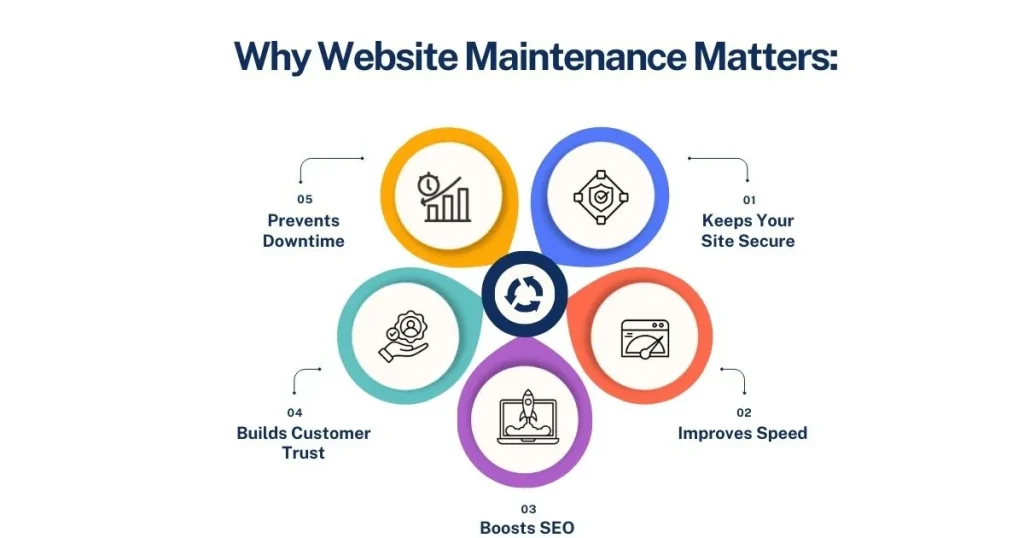
Here’s why website maintenance matters:

  • Keeps Your Site Secure: Regular updates protect your website from hackers and malware.
  • Improves Speed: A faster website keeps visitors happy and reduces bounce rates.
  • Boosts SEO: Search engines rank well-maintained websites higher.
  • Builds Customer Trust: An updated website shows customers that your business is active and reliable.
  • Prevents Downtime: Regular maintenance can catch and fix problems before they cause your site to crash.

How Website Maintenance Helps Your Customers

A well-maintained website is good for your customers, too. It makes their experience on your site smooth and enjoyable. Here’s how it benefits them:

  1. Fast Loading Speed: Nobody enjoys waiting for a slow website. Regular maintenance keeps your site running fast.
  2. Updated Information: Customers rely on your website for the latest updates about your products, services, and offers.
  3. No Errors: Regular maintenance fixes broken links and pages, so customers don’t get frustrated.
  4. Better Security: Your customers’ data stays safe when your website is secure.

When your website works well, it builds trust and encourages visitors to stay longer and even make purchases.

Step-by-Step Guide to a Website Maintenance Plan

Here’s a simple method for maintaining your website.

1. Set Your Goals

Before starting website maintenance, it’s important to decide what you want to achieve. Clear goals help you focus on the most important tasks and make sure your efforts match your business needs.

Here are some common goals for website maintenance:

  • Improve Security: Regularly update and check your website to keep it safe from hackers and malware.
  • Increase Speed and Performance: Make sure your website loads quickly and runs smoothly so visitors have a better experience.
  • Add Fresh Content: Keep your site updated with new blog posts, product details, or customer reviews to keep visitors interested and improve SEO.
  • Fix Errors: Check and fix broken links, missing pages, or outdated information to make your site reliable and easy to use.
  • Boost Search Rankings: Optimise your site for search engines by updating keywords, and meta tags, and improving loading times to attract more visitors.

By setting these goals, you’ll have a clear plan for maintaining your website. Review and update your goals regularly to keep your website supporting your business. A well-maintained website saves time, builds trust, and helps your business grow.

2. Check Your Website’s Current State

Before you start maintaining your website, it’s important to check how it’s working right now. This will help you figure out what needs fixing or improving.

You can use free tools like Google PageSpeed Insights to check how fast your website loads. Another tool, Screaming Frog, helps find broken links that may frustrate your visitors.

Here are the key areas to check:

  1. Speed: Does your website load quickly? A slow site can make visitors leave, so speed is important.
  2. Mobile-Friendly: Open your website on a phone. Does it look good and work properly? Many people use their phones to visit websites, so it’s important to give them a good experience.
  3. Content: Look at your website pages. Are there any with old or missing information? Keep your content updated to make it useful for visitors.
  4. SEO: Check if your website is optimised for search engines. This means using the right keywords, good titles, and descriptions that help your site rank higher on Google.

Doing this check will give you a clear idea of what’s working and what needs improvement. It’s like giving your website a health check before you start fixing or updating anything. This step makes sure you focus on the areas that matter most to improve your website.

3. Decide on a Budget

Taking care of a website costs money, so it’s important to plan a budget that fits your needs. This way, you can make sure you’re prepared for all the expenses that come with website maintenance.

Here are some things you may need to spend money on:

  1. Hosting and Domain Renewal: You need to pay regularly to keep your website online and your domain name active.
  2. Backup Services: It’s important to back up your website data. If something goes wrong, backups let you restore your site quickly.
  3. Plugins or Tools: Your website might use plugins or software to add features or improve performance. These sometimes require paid updates or subscriptions.
  4. Professional Help: If you don’t have the technical skills to handle updates or fix issues, you may need to hire a professional to help you.

Having a budget means you’re ready for both regular costs and surprise expenses, like fixing sudden issues or upgrading tools.

Start by listing all the services and tools your website uses, and find out how much they cost. Add a little extra for unexpected problems. This way, you’ll avoid stress and keep your website running smoothly without breaking the bank. Planning your budget now will save you time and worry later.

4. Make a Maintenance Schedule

To keep your website running smoothly, it’s helpful to create a simple schedule. A schedule helps you stay organised and ensures you don’t miss important tasks.

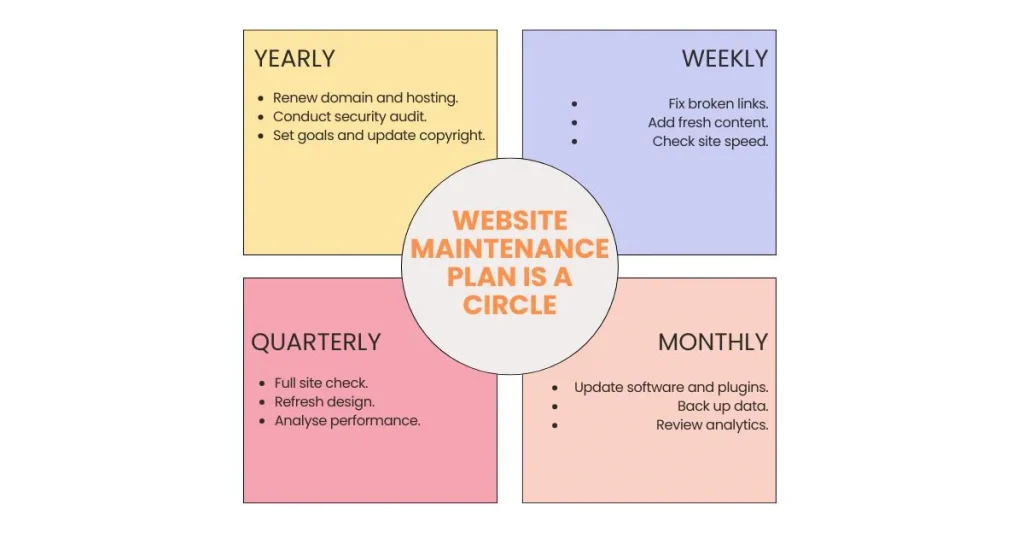
Here’s an example of what your maintenance schedule could look like:

  1. Weekly Tasks
  • Check for broken links and fix them.
  • Update your website with fresh content, like blog posts or news.
  • Monitor your website’s speed to make sure it loads quickly.
  1. Monthly Tasks
  • Update your website’s software and plugins to keep it secure.
  • Back up your website data so you don’t lose anything important.
  • Review Google Analytics to see how many visitors your site gets and what they are looking at.
  1. Quarterly Tasks
  • Do a full check of your website to make sure everything is working properly.
  • Review the design and layout of your site to keep it fresh and user-friendly.
  • Analyse how well your website is performing and look for ways to improve.
  1. Yearly Tasks
  • Renew your domain and hosting services to avoid downtime.
  • Perform a security audit to check for vulnerabilities.
  • Evaluate your website’s overall performance and set goals for the coming year (e.g., traffic, conversions).
  • Update copyright information in the footer to reflect the current year.

Following a schedule like this helps you stay on top of website maintenance without feeling overwhelmed. Regular care also prevents bigger problems in the future, like security risks or a slow website. Stick to your schedule, and your website will stay in great shape for your visitors and your business!

5. Assign Roles and Responsibilities

If you have a team, it’s important to decide who will take care of different tasks for your website. Clear roles make maintenance easier, faster, and more efficient. Everyone knows what they need to do, and nothing gets missed.

Here’s an example of how you can divide the work:

  1. Marketing Team: They can update blog posts, add new content, and work on SEO to improve search rankings.
  2. IT Staff: They can handle technical updates, like fixing bugs, updating software, and making sure the website is secure.
  3. Designer: The designer can focus on keeping the website’s design fresh, modern, and easy to use.

If you don’t have a team, you might need to hire outside help for specific tasks, like a freelancer or an agency.

Assigning clear responsibilities ensures that everyone knows their role and tasks get done on time. It also helps you avoid confusion or delays. By working together, your team can keep your website running smoothly and looking great for your visitors.

6. Start Maintaining Your Website

Once your plan is ready, start working on the tasks. Keep track of what you’ve done and review your progress regularly. Adjust the plan if your website or business needs to change.

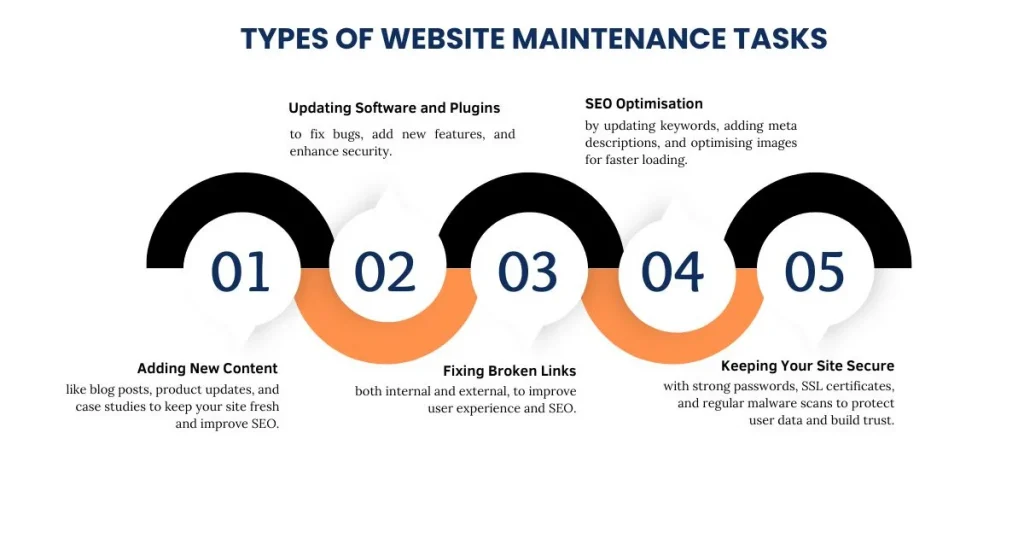
Types of Website Maintenance Tasks

Maintaining your website is like taking care of a car—you need to check different parts regularly to keep it running well. Here are the main types of website maintenance tasks and how you can do them easily.

1. Adding New Content

Adding fresh content to your website is important to keep it interesting and useful for visitors. It also helps your website rank better on Google. Here’s what you can do:

  • Write Blog Posts or News Updates: Share helpful information, company news, or industry insights.
  • Update Product Descriptions and Add Reviews: Keep your product details current and encourage customers to leave reviews.
  • Share Case Studies or Success Stories: Highlight how your product or service has helped others.

Adding new content shows that your website is active and gives visitors a reason to return. Plus, Google loves websites with fresh, relevant content, which can improve your SEO ranking.

2. Updating Software and Plugins

If your website runs on platforms like WordPress, it uses software and plugins to function. These tools need regular updates to stay secure and work smoothly.

  • Fix Bugs: Updates often repair issues that could cause your site to crash.
  • Add New Features: Updated plugins might bring new features that improve your website.
  • Improve Security: Updates protect your website from hackers and malware.

Tip: Always back up your website before updating software or plugins. If something goes wrong, you’ll be able to restore your website quickly.

Broken links happen when a page on your website is deleted or a link to another site stops working. These links frustrate users and harm your SEO.

  • Internal Links: Check for links on your site that go to pages that no longer exist.
  • External Links: Verify that links to other websites still work.

Use free tools like Broken Link Checker to find broken links easily. Fixing them improves the user experience and helps your site rank better on search engines.

4. SEO Optimisation

SEO (Search Engine Optimisation) is what helps your website appear in Google search results. Regularly updating your SEO is key to staying competitive.

  • Update Keywords: Research the words people are searching for and use them in your content.
  • Add Meta Descriptions: Write short summaries for each page to help Google understand your content.
  • Optimise Images: Compress images so they load faster. This helps your website speed, which is good for SEO.

By keeping your SEO up-to-date, you ensure that your website stays visible and attracts more visitors.

5. Keeping Your Site Secure

Security is one of the most important parts of website maintenance. A secure website protects your business and customer information.

Here’s how you can keep your site safe:

  • Use Strong Passwords: Choose passwords that are hard to guess and update them regularly.
  • Install an SSL Certificate: This encrypts data and makes your website safer for visitors. You can recognise secure websites by the padlock symbol in the browser.
  • Update Software: Outdated software is an easy target for hackers. Regular updates fix security issues.
  • Scan for Malware: Use tools to check your website for viruses or malicious code.

A secure website builds trust with your visitors and keeps your data safe from cyber threats.

Common Mistakes to Avoid

Even with a good plan, mistakes can happen. Here are a few things to watch out for:

  • Skipping Backups: Always back up your website before making changes.
  • Ignoring Security Updates: These updates are essential for keeping hackers away.
  • Neglecting Mobile Users: Test your website on smartphones to ensure a good experience.
  • Delaying Fixes: Small issues can grow into big problems if ignored.

Stay proactive to avoid these common pitfalls.

Conclusion

Website maintenance is not just about fixing problems; it’s about keeping your website fast, secure, and user-friendly. For startups, a well-maintained website builds trust, improves performance, and supports business growth. By setting clear goals, sticking to a schedule, and addressing different types of maintenance tasks, you can ensure your website remains an asset to your business.

Start maintaining your website today, and you’ll save yourself from bigger headaches in the future. Keep in mind, that a well-maintained website leads to happy customers!

How to Do Competitor Keyword Research? A Guide to Tips & Tools

Learning what your competitors are doing can help you stand out. One way to do this is by studying their keywords. By finding out which keywords help them rank, you can change your SEO and marketing plans to get more traffic and turn visitors into customers. This can give you a competitive edge.

This guide will show why competitor keyword research matters, tools that can help, and how to use this info to grow your business.

What Are Competitor Keywords?

Competitor keywords are the search terms that help your competitors show up on Google. They can be from unpaid searches or paid ads. For example, if you run an online aquarium shop, words like “Exotic fish delivery” might also help your competitors get clicks. People searching might visit your site or theirs. Finding these keywords helps you see what you’re up against and improve your SEO plan.

Competitor Keyword Research

The Importance of Competitor Keyword Research

Conducting competitor keyword research is essential for refining your digital marketing and SEO strategies. It allows you to:

  • Understand Audience Intent: Knowing what terms people use helps you better understand their needs and behaviours.
  • Identify Gaps and Opportunities: You can uncover untapped keywords or areas where your competitors are outperforming you.
  • Set Realistic Benchmarks: By analysing competitors, you can set realistic goals and better understand keyword competition and difficulty.

How to Find Competitor Keywords?

Finding competitor keywords is an important step to improve your SEO plan and stay ahead. By seeing which keywords your competitors use, you can find chances to make your website rank better. You can close keyword gaps, follow new trends, and get more people to find your site. To see what keywords your competitors use, you can try different tools. Below are some methods you can use:

Competitor Keyword Research Tool

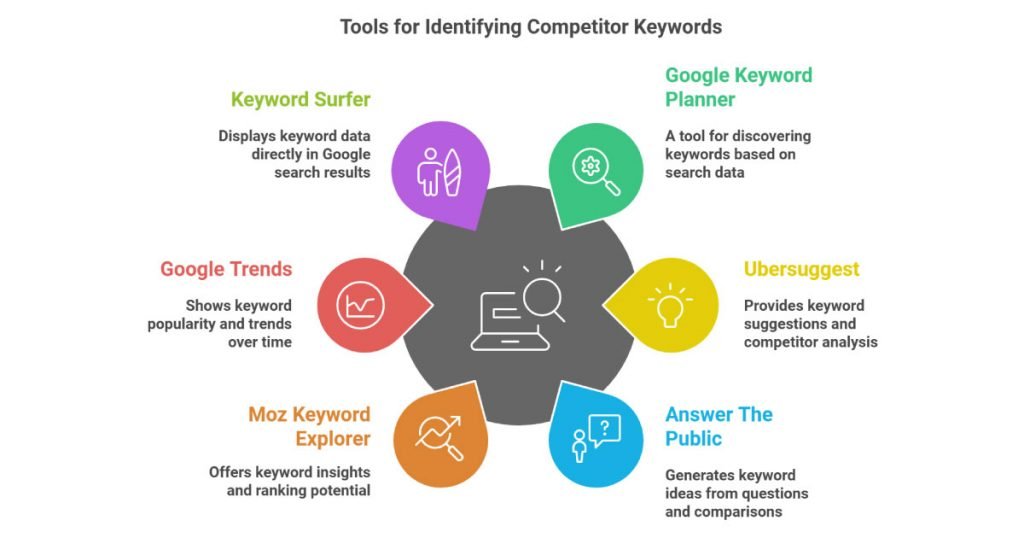
1. Google Keyword Planner

Google Keyword Planner is a free tool provided by Google Ads that allows you to discover keywords related to your business. Although it is mainly designed for paid search campaigns, it can still be used for organic keyword research.

  • Features:
    • Gives keyword ideas by looking at a competitor’s website or your own business.
    • Shows how often people search for each keyword and how hard it is to rank.
    • Provides cost estimates for Google Ads to see how competitive a keyword is.
  • How to Use:
    • Login to Google Ads and go to Google Keyword Planner in the Tools menu.
    • Use “Discover New Keywords” to type in a competitor’s URL or your product.
    • Check the keyword list for ideas and see how often they are searched.
  • Limitations:
    • Mostly useful for paid search ads.
    • Shows search numbers in broad ranges, not exact counts.


2. Ubersuggest

Ubersuggest, developed by Neil Patel, is a free SEO tool that offers keyword suggestions, search volume, competition analysis, and more.

  • Features:
    • Gives keyword ideas and shows what keywords your competitors use.
    • Shows data like how often people search, cost-per-click (CPC), and competition.
    • Has an “SEO Analyser” that gives a full report on competitor websites.
  • How to Use:
    • Go to the Ubersuggest website and type in a competitor’s website.
    • See the top keywords your competitor ranks for.
    • Use the “Keyword Ideas” section to find new keyword ideas.
  • Limitations:
    • The free version only allows a few searches each day.
    • Doesn’t have as much keyword data as paid tools.

3. Answer The Public

Answer The Public is a unique tool that helps you generate keyword ideas based on questions, prepositions, and comparisons related to your seed keyword.

  • Features:
    • Creates a big list of long-tail keyword ideas and searches.
    • Shows the questions people ask about your topic.
    • Helps you find trending keywords from popular searches.
  • How to Use:
    • Type a keyword or phrase into the tool’s search bar.
    • See keyword ideas like questions, comparisons, and prepositions in a visual format.
  • Limitations:
    • You can only use it for free a few times each day.
    • Doesn’t show how many people search for a keyword or how hard it is to rank.

4. Moz Keyword Explorer (Free Version)

Moz offers a limited free version of its Keyword Explorer tool, which can be useful for discovering keyword ideas and assessing their potential for ranking.

  • Features:
    • Shows how hard it is to rank for a keyword and its potential.
    • Displays how often people search for a keyword and the chance they’ll click.
    • Suggests related keywords and questions.
  • How to Use:
    • Create a free Moz account.
    • Type in a keyword or website to see keyword ideas and SEO info.
  • Limitations:
    • You can only do a small number of free searches each month.
    • Some advanced tools are only for paid users.

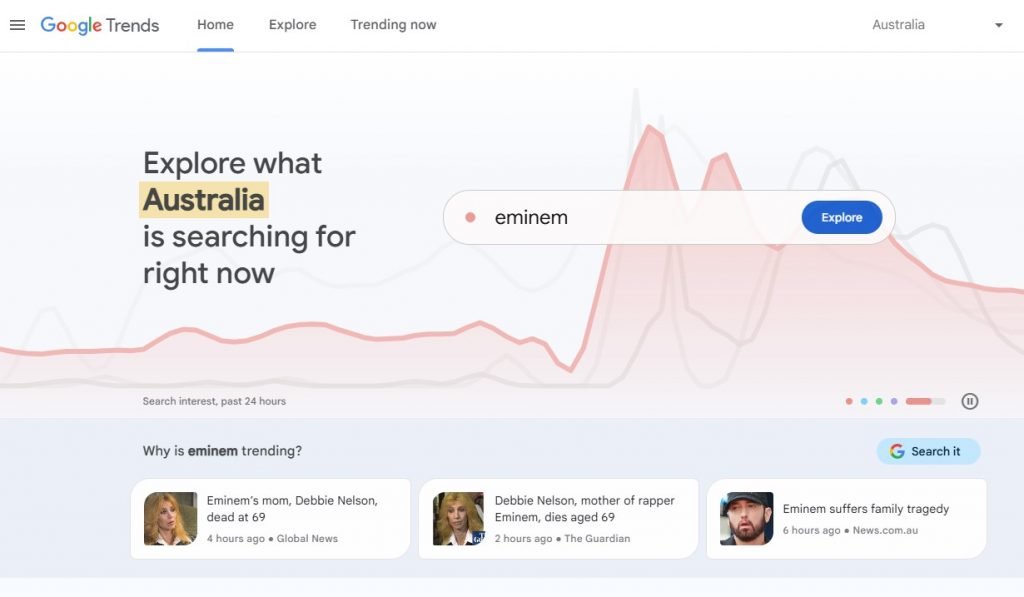
5. Google Trends

Google Trends is a free tool that lets you explore the popularity of search queries over time.

Google Trends
  • Features:
    • Shows how keywords are trending in different places and over time.
    • Lets you compare how popular up to five search terms are.
    • Gives ideas about related searches and topics.
  • How to Use:
    • Go to the Google Trends website and type a keyword or topic.
    • Compare keywords and see past search data and trends.
  • Limitations:
    • Doesn’t show exact numbers for search volume or competition.
    • Best for checking trends, not for deep keyword research.

6. Keyword Surfer

Keyword Surfer is a free Chrome extension that delivers keyword data directly within your browser as you browse Google search results.

Keyword Surfer
  • Features:
    • Shows how often people search for keywords and their CPC right in Google.
    • Gives ideas for new keywords and related words.
    • Lets you see the most popular search terms used by your competitors.
  • How to Use:
    • Add the Keyword Surfer extension to Chrome.
    • Search on Google and see keyword info like search volume and related words.
  • Limitations:
    • Only works on Google.
    • Doesn’t give as much detail as advanced keyword tools.

7. Soovle

Soovle is another free tool that generates keyword suggestions from multiple search engines and platforms, including Google, Bing, YouTube, and Amazon.

  • Features:
    • Gives you keyword ideas from different search engines and sites.
    • Helps find popular and related keywords on many platforms.
  • How to Use:
    • Go to the Soovle website and type in a keyword.
    • See keyword ideas from Google, YouTube, Amazon, and more.
  • Limitations:
    • It doesn’t show how many people search for a keyword or how hard it is to rank.
    • Doesn’t have tools for deep keyword research.

Key Metrics to Look For When Analysing Competitor Keywords

When studying competitor keywords, focus on important numbers to learn from their industry specific SEO strategy. These numbers show which keywords bring them traffic, how hard those keywords are to rank for, and where you can improve your content. By checking these details, you can find missing keywords, understand what people are looking for, and make smarter choices to help your website rank higher. Here are the key metrics to look for when analysing competitor keywords:

Keyword  Research Way

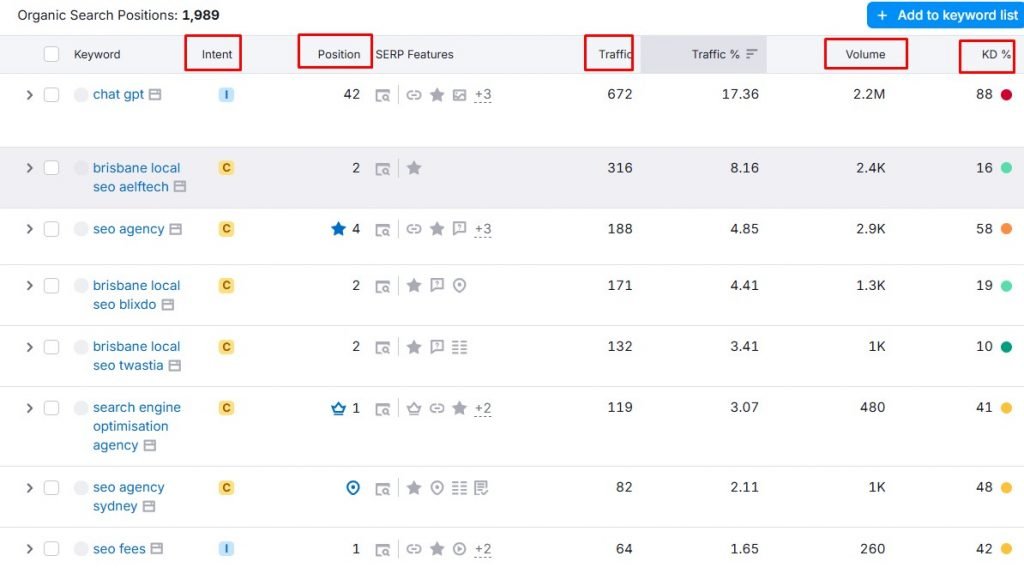
1. Search Volume

This indicates the frequency with which a keyword is searched each month. Keywords with more searches reach more people but have more competition.

2. Keyword Difficulty

This indicates the level of difficulty in ranking for a keyword, based on the amount of competition. It’s best to choose keywords that get lots of traffic but aren’t too competitive.

3. Cost Per Click (CPC)

CPC shows how much money advertisers pay to use a keyword. Keywords with high CPC often bring more sales, so they are good for paid ad campaigns.

4. Search Intent

Understanding search intent is crucial for website content. Total four main types of search intent:

  • Informational: People are looking for information (e.g., “types of flowers”).
  • Navigational: Users are looking for a specific website (e.g., “1-800-flowers”).
  • Commercial: Searchers are researching products or services (e.g., “best flowers for delivery”).
  • Transactional: Users are ready to make a purchase (e.g., “buy flowers near me”).

By looking at why competitors use certain keywords, you can make your own content and ads more focused.

5. Competitive Density

Competitive density shows how busy a keyword is. Keywords with high density cost more per click and are harder to rank for in SEO.

Tips for Choosing the Best Competitor Keywords

Picking the right competitor keywords is key to a good SEO plan. Choosing the best keywords makes your website easier to find, brings in the right visitors, and keeps you ahead of others. However, not all competitor keywords are useful. You should think about things like how often a word is searched, how hard it is to rank for, and why people are searching for it. These are a few tips to help you discover the most effective keywords

  • Look for Keyword Gaps: Look at the keywords your competitors are using that you don’t have. These are often chances you haven’t used them yet.
  • Target Low Competition Keywords: Big keywords with lots of searches can be tempting, but they are harder to rank for because many people are using them. Smaller, less popular keywords can give you a better chance to rank higher.
  • Combine Organic and Paid Strategies: Don’t stick to just one kind of keyword. Use both free and paid keywords together to get the best results for your marketing.
  • Consider Long-Tail Keywords: These keywords are more detailed, have less competition, and work well for smaller, focused groups.

Conclusion

Studying your competitors’ keywords is a smart way to improve your SEO and PPC. By knowing which words they focus on, you can find new ideas, avoid tough competition, and grow online. You can use free tools like Google Keyword Planner or advanced ones like SpyFu and Semrush. Look at things like how often a word is searched, how hard it is to rank for, its cost per click (CPC), and why people search for it.

By analysing your competitors’ keywords, you can enhance your own strategy and gain a competitive edge. This will help you get more visitors, beat your competitors, and reach your goals.

How to Create Effective Website Content: 9 Tips You Need to Know

Effective website content is key to your business’s success online. Whether you have an online store, a blog, or a company website, your content is what helps you connect with visitors and turn them into customers. Good content doesn’t just give information; it grabs attention, builds trust, and persuades people to act. 

Creating great website content is more than just writing words. It’s about giving your audience what they need. When you understand what your visitors are looking for, and create content that solves their problems or answers their questions, you’ll attract more visitors and keep them on your site longer. This can lead to more sales, sign-ups, or other actions you want them to take. 

In short, the best website content speaks to your audience’s needs and guides them toward what they should do next. When your content is helpful and valuable, it helps grow your business and builds a strong relationship with your customers.

1. Understanding Your Audience: The Key to Effective Website Content

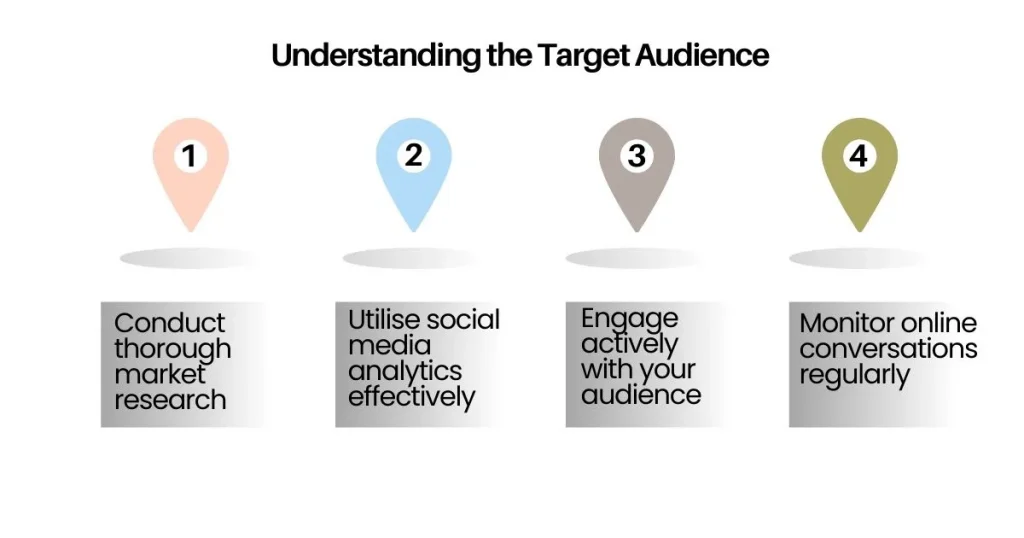
To write content that resonates with your audience, you need to first understand who they are. Creating content for the right audience is essential for increasing engagement and conversions. Effective website content starts with knowing your audience.

Defining Your Audience

  • Demographics: Age, gender, location, income, etc.
  • Psychographics: Interests, attitudes, and lifestyle choices.
  • Needs and Challenges: What are your audience’s pain points? What are they seeking?
  • Buyer Personas: Creating detailed buyer personas helps you understand the motivations of your ideal customers.

Tools to Understand Your Audience

  • Google Analytics: Use data from Google Analytics to learn who’s visiting your website and what they’re doing.
  • Surveys and Feedback: Ask your current audience for feedback on what they need.
  • Social Media Insights: Platforms like Facebook, Instagram, and Twitter offer tools to track engagement and audience demographics.

By creating audience profiles, you will be able to craft effective website content that speaks directly to their needs and preferences.

2. Setting Clear Goals for Your Effective Website Content

Every piece of content on your website should have a purpose. Whether you want to inform, entertain, or encourage people to take action, having clear goals for your content helps you stay focused. Effective website content should always align with specific goals.

Identifying Content Goals

  • Informative Content: Articles or blogs that educate your audience.
  • Conversion-Focused Content: Pages that drive sales, like product descriptions or landing pages.
  • Engagement Content: Social media links, interactive sections, and comment areas.
  • Customer Retention Content: Email newsletters or updates that keep customers coming back.

Aligning Content with Business Goals

Your content should always align with your business goals. For example, if you run an online store, your product pages should focus on encouraging sales. If you offer a service, your content should focus on lead generation. Creating effective website content starts with this alignment.

3. Creating Compelling Headlines for Effective Website Content

Your headline is the first thing people see, so it’s important to make it catchy and clear. A great headline can make a big difference in whether someone decides to keep reading or not. This is crucial for effective website content.

What Makes a Strong Headline?

  • Clarity: Keep it simple. Your headline should clearly explain what the content is about.
  • Value: Let the reader know what they’ll gain by reading the content.
  • Urgency: Phrases like “limited time” or “important” can make people act quickly.
  • Curiosity: Tease the reader with something they’ll discover in your content.
  • Keywords: Use keywords that people are likely searching for, especially for SEO.

4. Optimising Effective Website Content for User Experience (UX)

User experience (UX) is how visitors feel when they use your website. If your site is hard to use or slow to load, people will leave quickly. But if it’s easy to navigate and loads fast, they’ll stay longer and may take action. Effective website content is always designed with UX in mind.

Key Aspects of UX

  • Readability: Use big, clear fonts, short paragraphs, and enough space between lines.
  • Navigation: Make sure it’s easy for visitors to find what they need with clear menus and links.
  • Mobile-Friendly: Since many people browse on phones, your content should look good on all devices.
  • Fast Loading: A slow website frustrates users and hurts your rankings. Optimise images and minimise heavy scripts.

Tools for Improving UX

  • Heatmaps: Tools like Hotjar can show where visitors click on your site, helping you improve content layout.
  • User Testing: Test your site with real users to gather feedback and make improvements.
  • Responsive Design: A responsive design makes sure your content adapts well to different screen sizes, whether on phones, tablets, or desktops.

5. Writing Clear and Engaging Effective Website Content

Now that you have a plan and your site is user-friendly, it’s time to focus on writing content that your audience will enjoy and find useful. The key to effective website content is clarity and engagement.

Write in a Friendly, Simple Way

  • Use easy, everyday language that everyone can understand.
  • Talk directly to your readers by using “you” – it helps build a connection.
  • Skip the fancy jargon, unless your audience is used to it.

How to Structure Your Content

  • Introduction: Start by grabbing attention and explaining what the content is about or what problem it will solve.
  • Body: Break your content into small, easy-to-read sections with subheadings, bullet points, and pictures.
  • Conclusion: End with a summary of the key points and a call-to-action (like “sign up” or “learn more”).

Make Your Content Easy to Scan

  • Use bullet points to make key ideas stand out.
  • Make important words bold so they grab attention.
  • Keep your paragraphs short and simple to read.

6. Optimising Effective Website Content for SEO

Search engine optimisation (SEO) helps make your content easier to find online. Without SEO, even the best effective website content won’t reach its full potential.

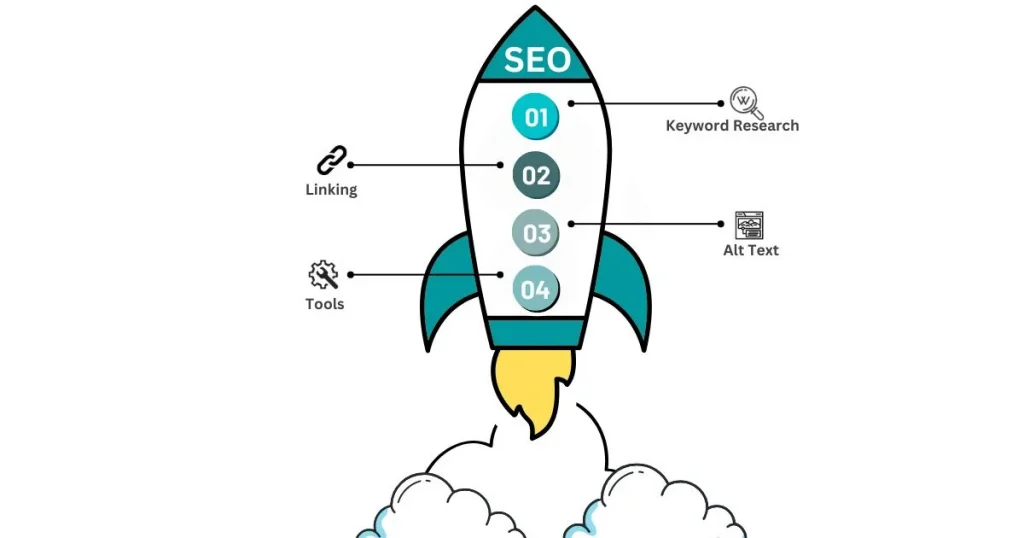
Improve Your Content

  • Keyword Research: Research words people use to search for your topic.
  • Linking: Add helpful links to other pages and websites.
  • Alt Text: Write short descriptions for images to make them accessible.
  • Tools: Try tools like Grammarly or SEO plugins to refine your content.

Keyword Research

  • Long-Tail Keywords: These are specific phrases that may be easier to rank for and can bring in more targeted visitors.
  • Google Keyword Planner: A tool that helps you find keywords that people are searching for.
  • SEO Tools: Use tools like SEMrush, Ahrefs, and Moz to track how well your content is doing.

On-Page SEO

  • Meta Descriptions: Write short, attractive descriptions that encourage people to click on your page from search results.
  • Title Tags: Include your main keyword in your title tags to help search engines understand what your page is about.
  • Internal and External Links: Link to other pages on your website and to trustworthy external websites to improve SEO.

7. Writing for Conversions: Call-to-Action (CTA) Strategy

A Call-to-Action (CTA) is a prompt that tells your visitors what to do next after reading your content. Whether it’s signing up for a newsletter, making a purchase, or reaching out for more information, a good CTA can guide them towards taking action. Effective website content always includes a strong CTA.

How to Write Effective CTAs

  • Use Strong Action Words: Choose words like “buy now,” “get started,” or “download” to make it clear what action you want them to take.
  • Offer Value: Let visitors know what they’ll get by clicking. For example, “Get your free guide” or “Join today for exclusive discounts.”
  • Create Urgency: Words like “limited-time offer” or “last chance” can encourage people to act quickly.

8. Proofreading and Editing Effective Website Content

Once your content is written, the next step is to proofread and edit it. This ensures your content is error-free and polished before publishing.

Common Mistakes to Avoid

  • Spelling and Grammar Errors: These can make your content look unprofessional, so always check for mistakes.
  • Awkward Sentences: If a sentence doesn’t flow smoothly, rewrite it so it’s easier to understand.
  • Overusing Jargon: Use simple language unless your audience expects technical terms.

9. Monitoring and Updating Effective Website Content

Once your content is live, it’s important to keep an eye on it and make updates when needed. This ensures it stays useful and continues to bring in visitors.

Monitor Your Content’s Performance

  • Use Google Analytics to track how your content is performing, including traffic, bounce rate, and more.
  • Monitor conversion rates to see if your content is helping you achieve goals like making sales or gaining sign-ups.

Keep Your Content Updated

  • Refresh old content with up-to-date information to maintain its relevance.
  • Add new case studies, testimonials, or examples to keep your content engaging.
  • Repurpose existing content into other formats like videos or infographics for broader reach.

Conclusion

Creating great website content takes time, but it’s worth it. By understanding your audience, setting clear goals, writing in a simple, friendly tone, optimising for SEO, and focusing on conversions, you can create content that not only attracts visitors but also turns them into loyal customers.

Don’t forget to update your content regularly to keep it fresh and effective. By tracking your content’s performance, you can keep improving and making it work harder for your business. With the right strategy, your content will help grow your online presence and drive success.

Creating effective website content will pay off with time and effort, leading to business growth and customer trust.

6 Reasons Why Website Analytics Are Crucial for Your Small Business

As a small business owner, you have lots of tasks to handle, like making products and doing marketing. It’s easy to forget about website analytics, but they are important. They give you helpful information to make smart choices and help your business grow.

In this blog, we’ll talk about how website analytics can help your small business grow. We’ll give you tips on how to get started and show you how tracking important numbers can help your business get bigger.

What Are Website Analytics?

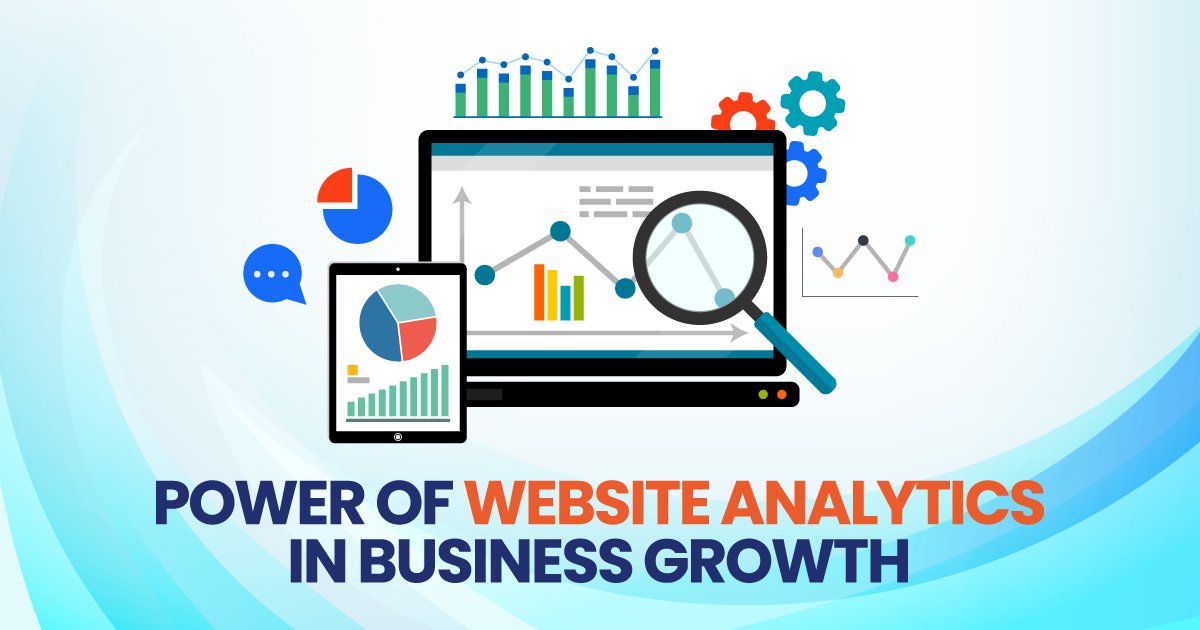
Website analytics is about collecting and studying data from your site. With tools like Google Analytics, you can see who visits your site, which pages they check out, how long they stay, and where they’re coming from. It’s like a GPS for your site that helps you make smart choices to improve your online presence.

Website Analytics

If you want to grow your small business, website analytics can help. They show you how to make your website design and marketing better. Analytics help you understand your audience, so you can make your content better and increase the number of people who take action on your site. This is important for succeeding in the online world.

Top Website Analytics Tools for Small Businesses

Google Analytics is a popular tool that helps you check website stats. It’s free and gives detailed reports. Some people think it’s a bit hard to use. For WordPress users, MonsterInsights is a great option. This plugin makes Google Analytics easier and shows simple reports right in your WordPress dashboard.

Here are some other tools you might consider:

  • Hotjar: Understand how users interact with your website effortlessly. It shows heatmaps to see where users click and scroll. You can watch session recordings to see their actions. Your website conversion rate is shown easily. Feedback polls let you know what they think. These tools give you important insights into user behaviour.
  • Crazy Egg: Discover how users interact with your website. It shows heatmaps to know where users click. You can do A/B testing to try out different designs. It also lets you watch session recordings to see what users do. This is great for making your site better and getting more people to take action.
  • SEMrush: SEMrush is a tool that helps with SEO, which means making your site show up in search results. It gives you detailed info on website traffic and lets you check out what your competitors are doing. This helps you make your site more visible to people searching online.

6 Key Ways Website Analytics Can Help Your Small Business

Website analytics are super helpful for growing your small business. They let you see how visitors use your site, showing what’s good and what needs fixing. With this information, you can make smart choices to improve your online presence. These are six key ways analytics can drive your business growth:

1. Understand Your Audience

Use website tools to learn about your visitors. Find out where they live, how old they are, and what they like. See what devices they use to visit your site. Use this info to make messages that fit them. This can help you sell more.

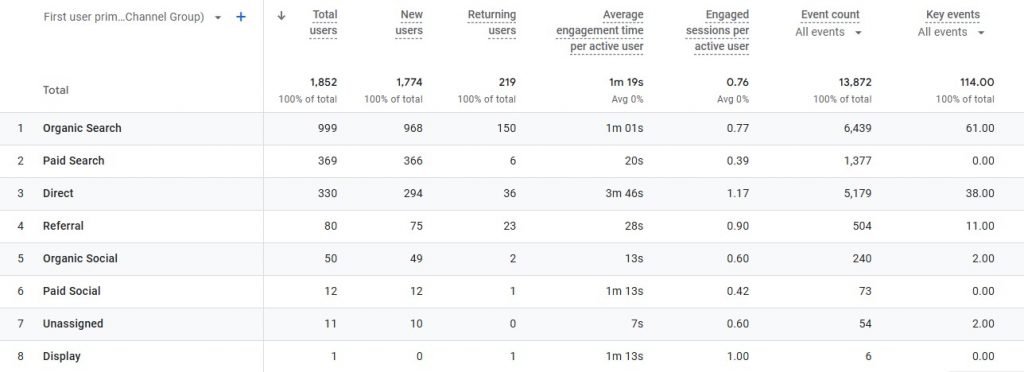
For example, Google Analytics User reports show who visits your site. This helps you know more about them. With this info, you can change your site to fit what they like and need.

Website Analytics Engagement

Tips: 

  • Use reports to understand your audience
  • Design for mobile users
  • Make informed design choices

2. Improve Website Performance

Performance is everything. Slow-loading pages, high bounce rates, and broken links can turn potential customers away. Analytics can help you identify problem areas so you can take action before they affect your bottom line.

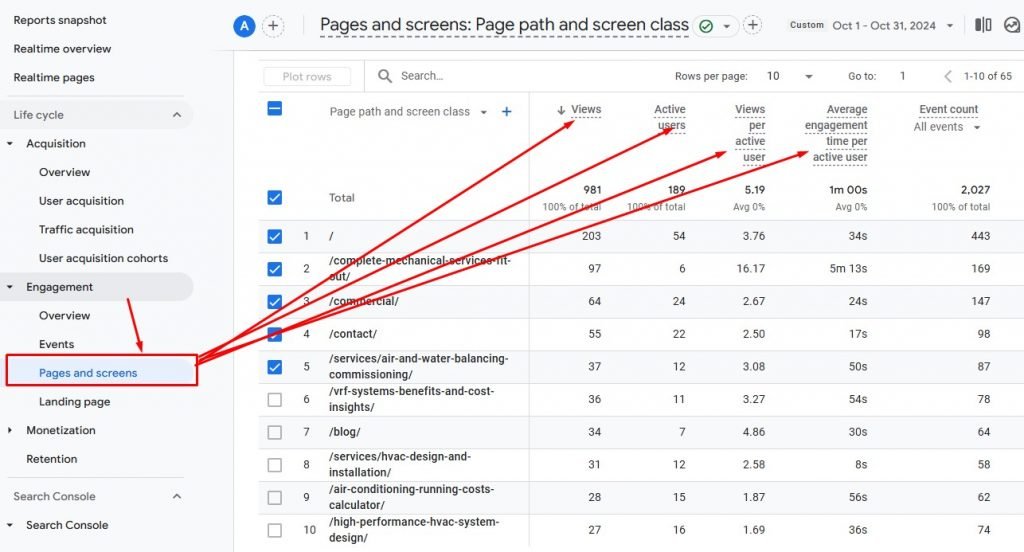
Google Analytics shows important numbers like how long people stay and how many leave quickly. This helps find what needs fixing. MonsterInsights gives a report on site speed to spot slow pages. Fixing these can make your site better and help you sell more.

Page Screen Times

Tips: 

  • Check website speed regularly
  • Fix slow-loading pages
  • Compress images
  • Faster websites drive sales

3. Track Marketing Campaigns Effectively

You can use website tools to see which ads bring the most people and sales. It helps you know where to spend money best. Whether you use email, social media, or ads, this info shows what works. Spend your money on the best ones.

Use UTM codes for your marketing campaigns to see how well each one is doing. Check your campaign data in Google Analytics to find out the return on investment (ROI). MonsterInsights makes it easy to view campaign reports right from your dashboard.

Tips: 

  • Focus on high-performing channel
  • Invest wisely
  • Optimise your marketing strategy

4. Improve Your SEO Strategies

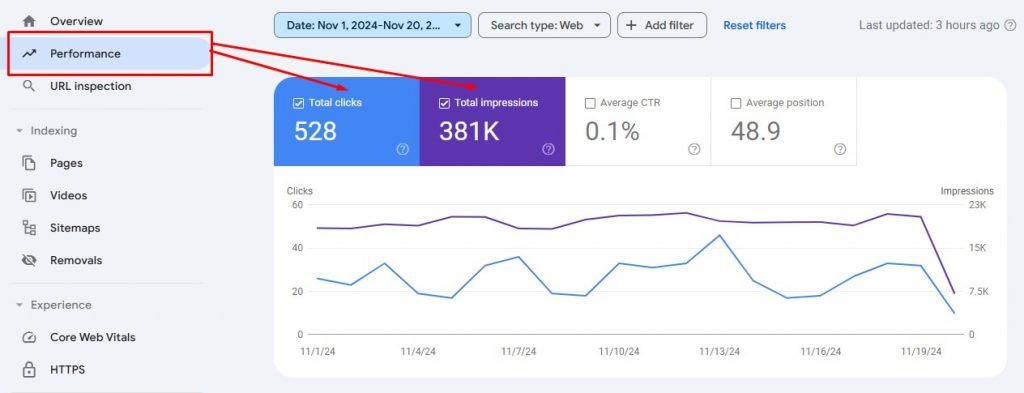
Website analytics are great for improving local SEO. They help you see which keywords and search terms bring visitors to your site. You can then adjust your SEO plan. Tools like Google Search Console shows which pages do well and which keywords bring people to your site. By using these top keywords in your content, you can improve your search rankings.

Google Console Impressions

Tip: 

  • Analyse popular topics
  • Create more relevant content
  • Update your website design
  • Ensure easy navigation

5. Measure ROI

Checking return on investment (ROI) is important for small businesses. Website analytics help you see how well your marketing is working. This lets you find out which ways of marketing make the most money. Google Analytics can track how much money you make from your ads.

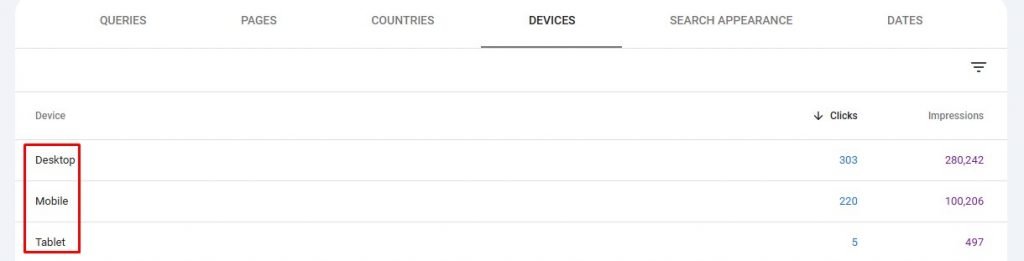
If you have an online store, you can use Google Analytics to track sales, money made, and how many people buy from you. With MonsterInsights, it’s easy to set up tracking, and you can see your sales info right from your WordPress dashboard.

Search Console Devices

Tips: 

  • Track ROI
  • Evaluate ad performance
  • Adjust your strategy
  • Maximise marketing budget

6. Make Data-Driven Growth Decisions

The best thing about website analytics is that they help you make smart choices. Instead of guessing, you can use real data to decide what to do. For example, you might see more people visiting from a certain area or notice some products selling really well. This information helps you change your plans and put money into what works best.

If you see a lot of people visiting a product page but not buying, it’s time to make changes. Try fixing the website design or adding better calls to action to encourage people to buy.

Tips: 

  • Analyse website data
  • Identify underperforming sections
  • Test new content or design
  • Increase engagement 
Result Website Analytics

Conclusion

Website analytics are very important for small businesses. They help you understand who visits your site and how to make it better. By using this information, you can make smart choices to help your business grow. You can also improve your marketing and get more people to buy from you.

Using tools like Google Analytics and Hotjar helps you see important numbers about your website. You can see if your ads are working, make your website show up better in searches, and learn how to make your site work better. This information helps you make smart choices to help your business grow in the online world.

Creating a website for a small business isn’t just about making it look nice. It’s important to design a site that helps your customers and makes their visit easy from start to finish. Use website tools to see how people use your site. This will help you make smart choices to improve the website. When you do this, you can turn visitors into happy customers who keep coming back.

8 Essential Elements for Designing the Perfect Website for Business

Are you a business looking to create a website that helps you connect with your audience and showcase your services? A well-designed website is key to attracting clients and making sure your business stands out online. But what exactly makes a “perfect” website for you?

Here’s a simple guide to help you create an effective, user-friendly website that drives results. Let’s dive into the 7 essential elements every website should have!

1. Clear and Easy Navigation

Organise your business website design so it’s easy to use. Put similar information together. Use simple menus and clear labels. This makes it easier for visitors to locate the information they need without hassle. Keep navigation simple and clear. Use menus that are easy to understand. This helps people find information quickly and easily. Avoid using confusing words. Common menu items should include Home, About, Services, and Contact.

  • Our Services
  • About Us
  • Contact Us

Help visitors find information on your website easily. Keep things simple and clear. Use easy-to-understand menus and labels. This will let people find what they need quickly. Keep navigation simple and clear. Use menus that are easy to understand. This helps people find information quickly and easily. Consider adding a search bar to help users quickly find specific info. Consistent navigation across all pages is key for a smooth experience.

2. Compelling, Clear Content

Your content should be engaging and easy to understand. Focus on:

  • Clear, concise language
  • Make your text easy to read by keeping paragraphs short. Break up long paragraphs into smaller parts. This helps people read and understand better.
  • Use headings to organise your text into sections. Bullet points can highlight important details.
  • Add images to show your ideas and make the page look nice. This helps visitors quickly find the info they need.
  • Offering valuable resources like blog posts, FAQs, or case studies

When writing for websites, focus on what your audience needs. Show that you understand and care about the challenges people with disabilities face. Use words that are important for search engines to help people find your site easily. Make sure your language is simple and your tone is friendly.

3. Strong Calls-to-Action (CTAs)

Encourage visitors to interact with your website using clear calls-to-action (CTAs). These are simple prompts like “Contact Us,” “Book a Consultation,” or “Learn More.” Make sure they are easy to see and click. Place them in smart spots on your site to get more people to take action. Use phrases like “Get Started,” “Book a Consultation,” or “Request More Information.” 

Book a Free Session

Make sure these CTAs are easy to find on your site. Put them on the homepage, in blog posts, and at the end of service pages. They should stand out and be easy to click.

4. Mobile Responsiveness

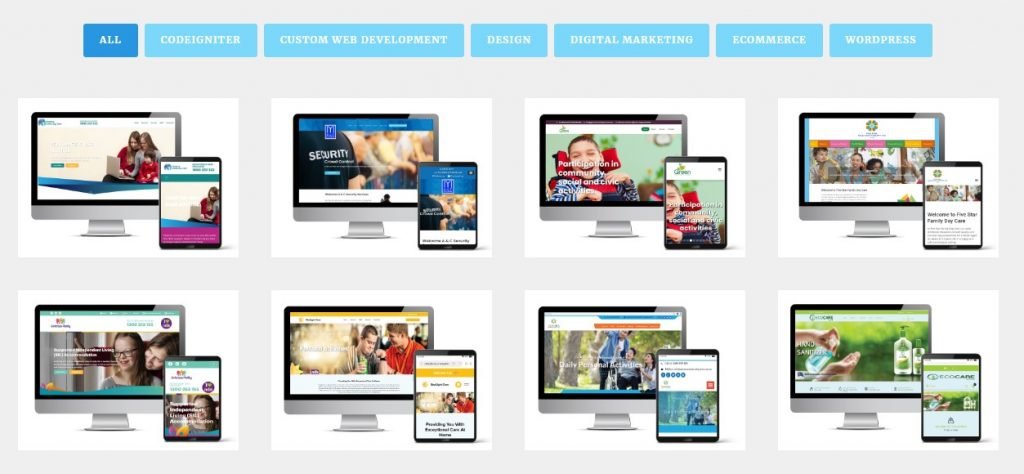
With so many people browsing the web on their phones, it’s essential that your website works well on mobile. Choose a responsive design that adjusts automatically to any screen size. 

Website Mobile Responsiveness

You need to ensure your website functions smoothly across all devices. Test it on phones, tablets, and computers. This helps everyone have a smooth and easy experience.

5. Accessibility Features

Making your website accessible to everyone, including people with disabilities, is a must. Implement features like:

  • Use descriptive text for images so everyone can access them. This text is called alt text. It tells people with visual impairments what the image is about. Alt text should explain what the image shows and why it’s important. Keep it simple and clear.
  • Keyboard navigation for those unable to use a mouse
  • Colour contrast for those with visual impairments

Following the Web Content Accessibility Guidelines (WCAG) helps your site meet important standards. It’s not just about rules; it’s about making your site usable for everyone. These guidelines make your website friendly and open to all people, including those with disabilities. Being inclusive means more people can enjoy your online content.

6. Social Proof and Testimonials

Trust is super important, especially for your business website. Make sure people feel confident that you will take good care of them. Show them you are reliable and trustworthy. Keep your promises and support them when they need help. This makes them feel safe and valued. You can show that your services really work by sharing testimonials or portfolios from your clients. These are real stories and feedback from people who have used your services. When others see these positive stories, it helps them feel confident in choosing you.

Portfolio of Client

It’s also a great idea to show any certificates or awards your business has earned. These achievements prove that you do a great job and meet high standards. Make sure to put them on your website so everyone can see them!

As your business grows, try to collect more testimonials. Ask clients if they would be willing to share how your services helped them. The more stories you have, the more trust you will build with new clients. Remember, keeping things real and honest is the best way to show you care and are committed to helping others.

7. Easy-to-Find Contact Information

An easy-to-find contact information will help the customers to reach your service. Display your contact information prominently so it’s easy for visitors to find and reach out to you. Make sure potential clients can find this information quickly. Include a dedicated contact page with:

  • Your phone number
  • Email address
  • Physical address
  • A contact form

Include links to your social media profiles on your website to provide visitors with additional ways to connect with you. This lets visitors connect with you in different ways. Make it easy for them to find and click these links.

8. Avoid Generic Stock Photos

Generic stock images can feel disconnected and impersonal. Use authentic photos of your team, clients (with permission) and your workspace. Real images create trust and make your website feel more authentic. If you must use stock photos, pick ones that feel real and relevant to your audience.

Additional Tips:

  • Consistency is Key: Make sure your website looks the same on every page and says the same things. This helps people trust your site and makes it easy for them to use. Keeping everything consistent makes visitors feel comfortable and happy.
  • Speed Matters: Make sure your website loads fast so visitors stay on your page. Speed up your site by making images smaller and using fewer plugins. This helps keep people interested and happy.
  • Regular Updates: Keep your website interesting by adding new blog posts often. Also, update your services page to show the latest information. This ensures visitors stay engaged and well-informed.

How to Find the Best Website Design Agency?

Choosing the right website design agency is crucial for your success. Here’s how you can find the best team to build your perfect website:

  • Look for experience with accessibility: Websites need to be easy for everyone to use. It’s important to pick an agency that knows the rules about making sites accessible. They should follow the best ways to help all users enjoy the website.
  • Check for a portfolio of excellent work: Look for a website design company that shows off great examples of their work. Make sure they can create sites that are easy to use and look nice. A good portfolio means they know how to make websites that people will enjoy using.
  • Read reviews and testimonials: When picking an agency, choose one with a history of doing a good job. Look for companies with lots of happy clients and positive reviews. This means they know how to make their customers satisfied.
  • Understand their process: A good agency will learn about your goals and who you want to reach, not just what you like in a design. Make sure they work with you and are open about how they do things. Working together is important!
  • Look for local agencies: When picking a website design firm in Sydney, look for local experts. They know the area and can give you personal help. Find a team that understands what you need and can make your site great.

Summing It Up

A great business website should be user-friendly and visually appealing. It needs clear menus so people can find things easily. The site should also work well on phones and tablets. Make sure it has strong buttons to click, is easy to read for everyone, and shows good reviews. Don’t forget to make it simple for people to contact you.

When picking a website design agency, choose one that understands your ideas. A good agency will help make your site useful and attractive. Look for website design experts who can make your site awesome and work well.

Good luck designing your website!

Front-End vs. Back-End Development: What You Need to Know

Have you ever wondered how websites work? How do they show pictures, text, buttons, and forms when you visit them? And how do they store all the information, like your login details or messages, safely behind the scenes? Websites are built using two main parts: the front-end and the back-end.

In this blog, we will explore front-end development, back-end development, and how they work together. We will also explain how WordPress fits into this world. WordPress is a popular platform that makes website building easier for people who are not professional developers. By the end, you will have a clear understanding of these two essential areas of web development.

What is Front-End Development?

The front end is what people see and use on a website. It includes everything that appears on your screen when you visit a website: text, images, buttons, menus, and forms. This part of a website is also called the client side because it happens on the user’s device. Front-End vs. Back-End Development involves designing how a website looks and ensuring that it works smoothly for users.

Main Components of Front-End Development

  1. HTML (Hypertext Markup Language):
    • HTML is the basic structure of any web page. It tells the browser what elements to display (such as headings, paragraphs, images, and links).
    • Think of HTML as the basic structure of a website. It gives a website structure and organises its content.
  2. CSS (Cascading Style Sheets):
    • CSS is used to style a website. It adds colours, fonts, and layouts to the content created with HTML.
    • If HTML is the basic structure, then CSS is the outer look and style. It makes the website look pretty.
  3. JavaScript:
    • JavaScript makes a website interactive. It allows you to do things like click buttons, fill out forms, and watch videos. It also helps change content dynamically without refreshing the entire page.
    • JavaScript is like the muscles of a website, enabling it to perform actions and react to user input.

Front-End Developer Responsibilities:

Example of Front-End Development

Imagine you visit an online store. The front-end of the store is everything you see: the images of the products, the search bar, the shopping cart button, and the form you fill out to check out. All of these elements are created using HTML, styled with CSS, and made interactive with JavaScript.

What is Back-End Development?

While the front-end is what you see, the back-end is what you don’t see. The back end works behind the scenes to run the website. It stores data, processes user actions, and ensures everything runs smoothly. This part of a website is often called the server-side because it involves tasks performed on the web server (a powerful computer that hosts the website).

Back-end development involves writing code that connects the website to databases, handles business logic, and processes user requests.

Main Components of Back-End Development

  1. Servers:
    • A server is a computer that holds the website’s files and information. When you enter a URL into your browser, the server sends the correct web page to your device.
    • It handles requests from users and sends back the appropriate response, such as a web page or a piece of data.
  2. Databases:
    • A database stores all the information a website needs, such as user accounts, product lists, or blog posts.
    • When you log into a website or submit a form, the back-end checks the database to verify your details.
  3. Programming Languages:
    • The back-end uses programming languages like PHP, Python, Ruby, or Java to perform tasks such as storing data or processing requests.
    • These languages help the server connect with the database and the front end.
  4. APIs (Application Programming Interfaces):
    • APIs act as messengers between the front-end and the back-end. They allow the front-end to request information from the back-end and display it on the website.
    • APIs make it possible for a user’s action on the front-end (like filling out a form) to be processed and stored on the back-end.

Backend Developer Responsibilities:

Example of Back-End Development

Imagine you log into your favourite social media platform. When you enter your username and password, the back-end checks the database to see if your login details are correct. If they are, the back-end sends a signal to the front-end, allowing you to access your account. This is another example of the Front-End vs. Back-End Development relationship.

How Front-End and Back-End Work Together

Now that you know what front-end and back-end development are, let’s see how they work together.

  1. You visit a website (Front-End): The front-end sends a request to the back-end, asking for data like images, text, and user information.
  2. The back-end processes the request: It checks the server and database to retrieve the requested data, such as your account details.
  3. The back-end sends data to the front-end: The back-end sends the requested data back to the front-end.
  4. The front-end displays the data: The front-end uses the data to update the webpage and show it to the user.

The front-end and back-end need to communicate well to create a smooth experience for users. If either part fails, the website won’t work properly. This integration is crucial in understanding Front-End vs. Back-End Development.

WordPress: Combining Front-End and Back-End Development

WordPress is one of the most popular tools for building websites worldwide. It’s a content management system (CMS) that simplifies the process of building and managing websites without needing advanced coding skills. WordPress is used by millions of people, from small business owners to large companies, to create websites.

How WordPress Works

WordPress has both front-end and back-end components:

  • Front-End in WordPress: This is what users see when they visit a WordPress website. WordPress themes control the design of the front-end. Themes use HTML, CSS, and JavaScript to make the website look beautiful and functional.
  • Back-End in WordPress: This is where the website owner or administrator manages the site. The back-end in WordPress is called the dashboard. It allows you to create and manage posts, pages, user accounts, and more. You don’t need to be an expert developer to use the back-end because WordPress provides an easy-to-use interface.

Why Use WordPress?

  1. Ease of Use: You don’t need to know how to code to build a website on WordPress. Its dashboard makes it easy to add new content, change the design, and manage your site.
  2. Customisation: You can choose from thousands of themes and plugins to customise your website’s look and functionality.
  3. Content Management: WordPress is perfect for managing content, such as blog posts, images, and videos.
  4. SEO Friendly: WordPress has many built-in tools and plugins that help optimise your website for search engines.
  5. Open Source: WordPress is open-source, which means it’s free to use and continuously improved by a global community of developers.

Front-End vs. Back-End Development: Key Differences

1. Visible vs. Invisible

  • Front-End: This is the part of the website that people see and use.
  • Back-End: This is the part that works behind the scenes, managing the website’s data and functionality.

2. Tools and Languages

  • Front-End: Uses tools like HTML, CSS, JavaScript, and front-end frameworks like React and Angular.
  • Back-End: It uses coding languages like PHP, Python, Ruby, and Java. It also involves managing servers and databases using tools like MySQL or MongoDB.

3. Focus on User Interaction vs. Functionality

  • Front-End: Focuses on creating an enjoyable and easy-to-use interface for the user.
  • Back-End: Focuses on ensuring the website functions properly, processes requests, and manages data securely.

4. Client-Side vs. Server-Side

  • Front-End: Works on the client side, meaning everything is processed on the user’s device (like a phone or computer).
  • Back-End: Works on the server side, meaning everything is processed on the website’s server.

Full-Stack Development: The Best of Both Worlds

Some developers are good at both front-end and back-end work. These developers are called full-stack developers. They can build both the visible part of the website and the invisible parts that make it work.

Why Full-Stack Development is Important

  • Versatility: Full-stack developers understand how both front-end and back-end work, allowing them to build a website from start to finish.
  • Better Communication: Full-stack developers can communicate with both front-end and back-end teams, making the development process smoother.
  • Problem-Solving: Since full-stack developers know both sides of development, they can troubleshoot and solve problems more effectively.

How to Become a Front-End, Back-End, or Full-Stack Developer

If you want to learn web development, here are some steps you can follow:

For Front-End Development:

  1. Learn HTML, CSS, and JavaScript: These are the basic tools for front-end development.
  2. Practice with Front-End Frameworks: Learn frameworks like React, Vue.js, or Angular to create more advanced websites.
  3. Master Responsive Design: Ensure websites look good on all devices (phones, tablets, and desktops).

For Back-End Development:

  1. Learn Programming Languages: Start with PHP, Python, or Node.js.
  2. Understand Databases: Learn how to work with databases like MySQL or MongoDB.
  3. Study APIs and Servers: Learn how to build and use APIs, and understand how servers work.

For Full-Stack Development:

  1. Master Both Front-End and Back-End: Start by learning front-end and back-end technologies.
  2. Work on Full-Stack Projects: Build projects that involve both the front-end and back-end to gain experience.

Conclusion

In short, knowing the difference between Front-End vs. Back-End Development is important for anyone interested in making websites. Both parts are key to building sites that work well and look good. Front-end developers care about what users see and use, while back-end developers handle the server side to keep everything working smoothly.

If you want to create a website, WordPress is a great choice because it makes the process easier by bringing together both front-end and back-end features. Whether you want to focus on front-end, back-end, or be a full-stack developer, understanding how these parts work together will help you build better websites.

Now that you understand Front-End vs. Back-End Development, which path will you take?

Conversion Rate Optimisation: Top Tips for Websites Struggling with Traffic

Is your website not getting many visitors? You’re not alone! Many sites struggle with this. But don’t worry, you can still make your website better. Conversion Rate Optimisation, or CRO, helps you make sure visitors do what you want them to, like signing up for a newsletter, buying something, or filling out a form.

CRO focuses on making the visit better for people, so they are more likely to do these things. Even with few visitors, you can use different ways to improve your website and get good results. Let’s look at some top tips to help your website succeed, even with low traffic!

What is the Conversion Rate?

Website traffic is very important for online businesses. More visitors can mean more customers and more money. Traffic also helps try new ideas with something called conversion rate optimisation (CRO). CRO means changing a website to get more people to buy things or sign up.

Big companies like eBay and Google have lots of visitors, so they can learn easily what works. Smaller websites don’t have as many visitors. This makes it harder to know what changes help. However small businesses can still improve their websites. They can use special tips and tricks that work even if they don’t have a lot of traffic.

What Constitutes a Good Conversion Rate?

Are you seeing a conversion rate of 3%, 5%, or even 10%? You might wonder if that’s the best you can do. On average, landing pages have a conversion rate of about 2.35%. The best 25% of them get rates of 5.31% or higher. The top 10% do even better, reaching 11.45% or more. Remember, what is considered a “good” conversion rate can change depending on your industry, niche, goals, traffic sources, and who your audience is. By knowing where you stand now, you can make steady improvements that match your business goals.

Some advertisers get conversion rates that are two or three times better than the average! So, do you want to be just average, or do you want your account to stand out and do really well?

We studied landing pages and conversion rates to find out what the best ones do. Guess what? You’re closer to getting better conversion rates than you think! You might just need to try some new and different ideas.

Key Points:

  • What is Conversion Rate Optimisation?
    Conversion Rate Optimisation, or CRO, is about making your website better so more people do things you want. This could involve making a purchase or subscribing to a newsletter. Think of it like fixing up a store so more people come in and buy things. It’s about small changes that make a big difference in getting people to take action.
  • Benefits of Conversion Rate Optimisation: CRO helps your website get more customers without needing extra visitors. By making small changes, you can encourage people to buy or sign up. It’s a smart way to make the most of your site!

How to Calculate Your Conversion Rate

Here’s how you calculate it: divide the number of conversions by the number of visitors, then multiply by 100 to get a percentage. It’s like finding out how many out of 100 visitors do what you want.

To track conversions, you can use special tools that show when people do things you want, like sign up or buy something. These tools let you set up a special event to count as a conversion, such as downloading an e-book. You choose the action, and the tool tracks it for you. It’s like having a helper that tells you when someone did what you hoped for on your website.

Let’s say 300 people downloaded your e-book, and 15,000 people visited your website. To find the conversion rate, you divide 300 by 15,000. This equals 0.02. Then, multiply 0.02 by 100 to get 2%. This means 2 out of every 100 visitors downloaded your e-book.

When calculating conversion rates, only count the visitors who see the pages where they can do what you want, like signing up or making a purchase. This helps you get the right conversion rate for each action you’re tracking. To find the overall conversion rate for your whole site, add up all the conversions and then divide by the total number of people who visited your site. It’s like making sure you’re only counting the right group of people to see how well your site is doing!

Challenges of Optimising Low-Traffic Websites

Testing is really important to make sure your website works well and makes money. To get good results from tests, you need a lot of data. More traffic means more data, but getting more visitors can be hard and expensive for new and small businesses.

Small websites can have a hard time improving their conversion rates because they don’t get as many visitors. This means it takes longer to see if the changes they make to the website are working. If they stop testing too soon, they might think something is working when it really isn’t. This can slow down how fast they can get better. It’s like trying to see how a new game works with only a few friends; you might not know if everyone likes it until more people try it out.

A/B testing is one way to see which website changes are best, but it can be tricky with low traffic. If your website doesn’t get many visitors, you might want to ask a CRO company for help. They can guide you through improving your site, even if not many people visit it. Knowing how CRO can help your website succeed is important for your online success!

Conversion Rate Optimisation Strategies for Low-Traffic Sites

For websites that don’t get a lot of visitors, it’s really important to turn those visitors into customers. Even if not many people visit, you want to make sure the ones who do take action, like buying something or signing up. To do this, you can use conversion rate optimisation (CRO) strategies. These are ways to make your website work better for you. These are some of the top tips for you:

Conduct Tests with Low Confidence Levels

In statistics, the confidence level tells you how sure you can be about your test results. A higher confidence level means you can trust the results more. For example, if you have a 95% confidence level, it means you’re 95% sure your results are right, with only a 5% chance they might be wrong.

When you test things on your website, like a new design, the confidence level helps you know how much data you need. But if your website doesn’t get many visitors, gathering enough data can be tough. To get results faster, you might use a lower confidence level.

When you test a new website design and you are 85% sure it’s right, you can decide what to do even if not many people visit. It might not be very exact, but it lets you try new ideas quickly without waiting for lots of visitors.

To make your website better, you can get help from a conversion rate optimisation company. They know the best ways to test changes, even if only a few people visit your site.

Monitor Micro-Conversions

Conversion is like a journey with many small steps leading to one big goal. These small steps are called micro-conversions, and the big goal is the macro conversion.

Micro-conversions show that people are interested in what you have. They are important for websites with few visitors because they happen more often. For example, a blog might have more people sign up for a newsletter than buy a book. Tracking these small actions helps you collect more information for testing.

While having more micro-conversions helps you test with fewer visitors, focusing too much on them can be tricky. They might not always lead to more money if they don’t directly help your main goal.

To make sure micro-conversions really help your website, think of them as part of the whole journey users take. Improving these small steps can make visitors happier and help you reach your big goals.

To make your website work better, think about getting help from a conversion rate optimisation company. They can help you track and improve both small and big steps to get better results!

Implement Significant Changes

When you’re testing a website that doesn’t get many visitors, it’s hard to learn much from small changes. But you can still find out what works best!

Instead of changing tiny details, try making big changes. Big changes can show you clearer results about what people like. For example, if you’re testing a new look for your website, changing the whole design might be better than just moving a button.

Imagine your old page gets 5 out of 100 people to do what you want (like sign up or buy something). If you make big changes and the new page gets 45 out of 100, that’s a big jump! This shows the new design is better.

So, making big changes can help you see what works best faster. If you want to make your website better, a conversion rate optimisation company can help. They know how to run tests that can improve your website’s performance!

Utilise Personalisation with Dynamic Data

Personalisation on a website means showing visitors things they like based on what they did before. This helps make more people do what you want, like buying something.

Websites can use information like what you searched for, where you live, or what you clicked on. For example, Spotify suggests songs based on what you listened to before. This is what makes using your site more fun.

Even if not many people visit your site, personalisation can still help. A small bookstore used a tool to suggest books people might like. This made their sales go up by 30%, and people spent 20% more money. To make your custom web application better, you can get help from experts. They know how to change things so your site works well for everyone.

Conduct Usability Testing

User testing is about seeing how well a website works for its visitors. It helps find problems and makes the site better, which is important for getting more people to do things like sign up or buy something.

Even if not many people visit your site, user testing is still useful. You don’t need a lot of people to get important feedback. The goal is to make your website easier to use, which can help increase conversions.

A local animal shelter wanted more online donations, but people couldn’t find the donation button easily. They tested it with users and found out the button was hard to see and confusing. So, they moved it to a better spot and changed the text to “Donate Now.” This small change made donations go up by 300%!

Integrate Feedback Forms

Conversion rate optimisation (CRO) makes your website simple to use. When people find your site fun and easy, they are more likely to do things they want, like buying stuff or signing up for emails.

To make these improvements, it’s important to know what your visitors think about your website. Big companies spend a lot of money to learn about their customers, but you can do it easily with feedback forms. These forms let you ask visitors how they feel about your site and what they need.

For example, an online clothing store added a feedback form that showed up after a minute. They learned that customers found the checkout process confusing. By making it simpler, the store had 25% more people finish buying things.

Where to Focus Your CRO Efforts?

Making your website better is like cleaning your room. Conversion Rate Optimisation (CRO) helps visitors do what they want, like signing up or buying. It’s important to know what to fix so visitors notice the changes. By focusing on key areas, you can make your site easier and more attractive:

Improve Your Homepage

Your homepage is like a friendly door. Since it’s the initial impression for visitors, ensure it’s inviting and friendly! Here’s how to make it better:

  • Show links to important product info.
  • Add a big, friendly button to sign up.
  • Use a chatbot to help with questions.

Tip: Try different titles and pictures to see what grabs visitors’ attention and makes them want to stay.

Make Pricing Clear

The pricing page is important for getting new customers. Here’s how to make it better:

  • Offer different pricing choices, like monthly or yearly.
  • Explain what each price includes.
  • Add a phone number for questions.

Example: One company added a simple email signup on their pricing page and got over 400 new contacts in three weeks!

Tip: Make prices clear and add customer reviews to build trust.

Boost Your Blog

A blog is a great chance to connect with visitors. Besides sharing helpful articles, you can:

  • Include calls-to-action (CTAs) to guide readers to sign up or learn more.

Tip: Use relevant CTAs within your posts, like inviting readers to download a free guide in exchange for their email.

Make CTAs Stand Out

CTAs are your way to encourage action. Make sure they are:

  • Easy to find and clearly worded.
  • Visually distinct with eye-catching colours.
    Example: A company saw a 36% increase in logins just by changing their button from an icon to text!

Tip: Use action-oriented phrases like “Get Your Free Quote Now” instead of just “Submit.”

Design Great Landing Pages

Landing pages are designed for specific actions, so keep them simple. For instance, if you’re promoting an event, include a video recap to entice visitors.

Tip: Every landing page should focus on a single objective, such as gathering email addresses or making a sale.

Simplify Your Forms

Whether it’s for signing up or contacting you, make forms easy to fill out.

  • Reduce the number of required fields.
  • Use clear labels and give feedback as users fill them out.

Tip: Keep forms short! The easier they are to complete, the more likely people are to finish them. Consider breaking long forms into smaller steps.

CRO Calculations

Conversion Rate Optimisation (CRO) is all about making the most of your website visitors. Instead of just wishing for more people to sign up or buy, you should look at how many people come to your site. Then, see how many actually do what you want, like signing up for your emails or buying a product.

Your conversion rate shows how many people visiting your site do what you want, like signing up or buying something. Instead of just counting these people, work on getting more visitors to take these actions. Here are two easy calculations to help you understand and improve your conversion rate:

Calculation 1: Counting Net New Customers

To find out how many new customers you need, divide your revenue goal by the average amount each customer spends. If you want to make $10,000 and your average sale is $100, you need 100 new customers.

Calculation 2: Setting Lead Goals

To set a lead goal, divide the number of new customers you want by your lead-to-customer rate. If you typically turn 20% of leads into customers and you want 100 new customers, you’ll need 500 leads.

Getting Started with Conversion Rate Optimisation (CRO)

If you’re wondering, “What’s the best way to begin with conversion rate optimisation (CRO)?” you can use a framework such as the PIE (Potential, Importance, and Ease) framework as your main foundation. This method helps you figure out which changes to make first by looking at three things: Potential, Importance, and Ease.

Using the PIE Framework

  1. Potential: How much improvement could this change bring?
  2. Importance: How valuable will this improvement be for your users and your goals?
  3. Ease: How easy or hard will it be to implement this change?

For each strategy you consider, give it a score from 1 to 10 (with 1 being the lowest and 10 the highest) for each of these three areas. Once you’ve scored all your ideas, add the scores together. The projects with the highest total scores are the ones you should tackle first.

Other Useful Frameworks

1. ICE Framework Similar to PIE, the ICE framework looks at Impact, Confidence, and Ease.

  • Impact: What is the expected effect of the change?
  • Confidence: How certain are you that this change will be effective?
  • Ease: How easy is it to implement?

Score each area and prioritise your efforts based on the total.

2. RICE Framework RICE stands for Reach, Impact, Confidence, and Effort.

  • Reach: How many users will this change affect?
  • Impact: How significant will the improvement be?
  • Confidence: How certain are you about the results?
  • Effort: How much work is needed?

In Summary

Even if your website doesn’t have a lot of visitors, you can still improve it with Conversion Rate Optimisation (CRO). Make sure your site is easy to use and has clear instructions like “Buy Now” or “Sign Up.”

Every visitor matters and even small changes can have a big impact. Try different things and check what works best by looking at your data. With some effort and smart ideas, your website can help your business grow. Keep improving, and you’ll see more people doing what you want!

The Future of E-Commerce in Australia: Digital Marketing Strategies for Success

E-commerce has become a significant part of the global economy, and Australia is no exception. Over the last decade, online shopping has transformed the way Australians buy goods and services. As more businesses shift to digital platforms, the competition in e-commerce is growing.

To succeed in this fast-evolving market, businesses must adopt effective digital marketing strategies. In this blog, we will explore the future of e-commerce in Australia and discuss the key digital marketing strategies that can help businesses thrive. From emerging technologies like artificial intelligence to evolving customer expectations, the landscape is changing, and staying ahead requires understanding the trends shaping the industry.

Understanding the E-commerce ecosystem in Australia

The e-commerce ecosystem in Australia is a complex network of businesses, consumers, and technology that supports online shopping. Here are the key components that make up this ecosystem:

Growth of E-Commerce in Australia

Australia has witnessed significant growth in the e-commerce sector, especially after the COVID-19 pandemic. More people than ever are comfortable shopping online, and the trend is expected to continue growing in the coming years. In 2023, Australia’s e-commerce market generated billions in revenue, and by 2025, it is projected to account for an even larger share of retail sales.

Key industries benefiting from this growth include fashion, electronics, and homeware. Many small businesses have also found success in e-commerce, thanks to the accessibility of digital platforms.

Several trends are shaping the future of e-commerce in Australia:

  • Shift to Mobile Commerce (m-commerce): More Australians are using smartphones and tablets to shop online, making mobile optimisation essential for businesses.
  • Personalised Shopping Experiences: Consumers expect personalised product recommendations and targeted ads, powered by AI and data analytics.
  • Sustainable Shopping: Many Australians are prioritising eco-friendly brands that focus on sustainability and ethical practices.

Challenges Facing Australian E-Commerce Businesses

Despite the growing opportunities, there are several challenges businesses face in the Australian e-commerce market:

  • Logistics and Delivery: Australia’s vast geography can make shipping costly and time-consuming.
  • Increasing Competition: As more businesses go online, competition is tougher than ever, making it crucial to stand out with unique value propositions.
  • Changing Consumer Expectations: Today’s consumers expect faster delivery times, seamless user experiences, and excellent customer service.

Photo Credit: hellozai

The e-commerce industry is undergoing a significant transformation, driven by rapid technological advancements and shifting consumer expectations. As we look to the future, several key trends are poised to redefine the way we approach online shopping. From the integration of artificial intelligence to the rise of mobile and social commerce, these developments promise to enhance the consumer experience and present new opportunities for businesses worldwide.

The Rise of Mobile Commerce (M-Commerce)

As mobile device usage continues to increase, mobile commerce is becoming a dominant force in the e-commerce space. Australians are increasingly using their phones to browse, shop, and pay for products, making it essential for businesses to ensure their websites and apps are mobile-friendly. A poor mobile experience can result in lost sales, so optimising websites for speed, simplicity, and functionality on mobile devices is key.

Impact of Artificial Intelligence (AI) and Machine Learning

Artificial intelligence and machine learning are revolutionising e-commerce. AI-driven tools allow businesses to analyse customer data and predict future shopping behaviours, enabling more personalised marketing campaigns. From chatbots providing instant customer service to AI algorithms that recommend products, these technologies are reshaping how businesses interact with customers.

Using Augmented Reality (AR) and Virtual Reality (VR) for Online Shopping

AR and VR technologies are becoming popular in online retail, offering customers an immersive shopping experience. AR allows users to “try on” products such as clothes, accessories, or makeup before purchasing. Similarly, VR can provide virtual tours of products or experiences, like home design or travel destinations. These technologies create engaging and interactive shopping experiences that can drive conversions.

The Shift Toward Sustainable and Ethical Shopping

Shoppers are increasingly aware of how their purchases affect the environment and society. Australian shoppers are no exception, with a growing preference for sustainable, eco-friendly, and ethically produced products. Businesses that align their practices with these values—such as offering eco-friendly packaging or supporting social causes—can build stronger relationships with customers.

Digital Marketing Strategies for Success

In the ever-evolving e-commerce landscape, effective digital marketing strategies are crucial for success. Here, we delve deeper into several key strategies Australian e-commerce businesses can employ to enhance their online presence, attract customers, and boost sales.

 1. Search Engine Optimisation (SEO) for E-Commerce

Search Engine Optimisation (SEO) is vital for increasing visibility on search engines like Google. For e-commerce businesses, optimising product pages and the overall website is essential to drive organic traffic.

  • Keyword Research: Start with thorough keyword research to identify what terms potential customers are using to search for products similar to yours. Tools like Google Keyword Planner and SEMrush can help uncover valuable keywords.
  • On-Page SEO: Optimise product titles, descriptions, and images using relevant keywords. Ensure that your URLs are clean and descriptive. Use headings (H1, H2) appropriately to structure content and enhance readability.
  • Technical SEO: In e-commerce SEO, technical factors play a critical role. Ensure your website loads quickly, is mobile-friendly, and has an XML sitemap. Fast-loading pages improve user experience and contribute to better search engine rankings.
  • Content Marketing: Create informative blog posts related to your products. For instance, if you sell outdoor gear, writing articles about camping tips can attract relevant traffic. Quality content can establish your authority in your niche and improve SEO.
  • Local SEO: For businesses with a physical presence, optimising for local search is essential. Implementing effective Local SEO strategies involves registering your business on Google Business Profile, using local keywords, and encouraging customer reviews to enhance your local visibility.

 2. Content Marketing and Blogging

Content marketing involves developing and sharing valuable content to capture the attention of and engage a specific target audience. For e-commerce, this means providing content that helps customers make informed purchasing decisions.

  • Informative Blog Posts: Write blogs that address customer pain points or answer common questions. For instance, if you sell skincare products, posts about skincare routines can guide customers toward purchasing your products.
  • Video Content: Videos are engaging and can showcase product demonstrations, reviews, or tutorials. Consider creating “how-to” videos that highlight your products in action, as this can significantly influence purchasing decisions.
  • User-Generated Content: Motivate customers to share their experiences through reviews, photos, or videos. Showcasing this content on your website or social media can foster community and build trust in your brand.
  • Visual Content: High-quality images and infographics can enhance product listings and blog posts. Use appealing visuals to highlight product features and benefits, making it easier for customers to visualise using your products.

 3. Social Media Marketing Strategies

Social media platforms offer unique opportunities for e-commerce businesses to connect with customers, showcase products, and drive traffic.

  • Platform Selection: Select the appropriate platforms tailored to your target audience. For instance, Instagram and TikTok are popular among younger demographics, while Facebook is effective for reaching a broader audience.
  • Engaging Content: Post a mix of content types, including promotional posts, behind-the-scenes content, user-generated content, and educational material. Engage with your audience through polls, quizzes, and comments to foster community.
  • Influencer Collaborations: Collaborate with influencers whose values align with your brand and who have a significant following in your niche. Influencers can help reach new audiences and lend credibility to your products.
  • Paid Advertising: Utilise social media ads to target specific demographics and reach potential customers. Platforms like Facebook and Instagram allow for detailed targeting based on interests, behaviours, and location.
  • Analytics and Insights: Regularly analyse your social media performance using insights provided by the platforms. This data can help you understand what content resonates with your audience and refine your strategies accordingly.

 4. Email Marketing: Personalisation and Automation

Email marketing continues to be one of the most powerful channels for e-commerce businesses. When executed correctly, it can strengthen customer relationships and boost sales.

  • Building an Email List: Encourage website visitors to subscribe to your newsletter by offering incentives such as discounts or exclusive access to new products.
  • Segmentation: Divide your email list into segments based on customer behaviour, interests, or demographics. This enables you to deliver targeted campaigns that resonate with each specific group.
  • Personalised Campaigns: Use customer data to personalise your emails. Address recipients by name, recommend products based on past purchases and send tailored content that reflects their preferences.
  • Automation: Use automation tools to send triggered emails based on customer actions, such as cart abandonment reminders, welcome emails, and post-purchase follow-ups. Automation saves time and guarantees timely communication.
  • Performance Tracking: Keep an eye on your email campaign performance by analysing open rates, click-through rates, and conversions. Utilise this data to refine your strategies and enhance future campaigns.

 5. Influencer Marketing in the Australian Context

Influencer marketing has gained traction in Australia, as consumers increasingly turn to social media for product recommendations. It’s a valuable strategy for e-commerce brands looking to enhance their visibility.

Source: ACCC

  • Identifying the Right Influencers: Research influencers within your niche who genuinely connect with their audience. Look for those who align with your brand values and have a substantial following.
  • Building Authentic Partnerships: Approach influencers with a personalised message, highlighting why you believe they would be a good fit for your brand. Collaborate on authentic content that showcases your products naturally.
  • Measuring ROI: Track the success of influencer campaigns by monitoring engagement metrics, referral traffic, and sales generated from influencer links. This helps assess the effectiveness of your partnerships.

 6. Paid Advertising: Google Ads, Facebook Ads, etc.

Paid advertising can quickly increase visibility and drive traffic to your online store, helping businesses reach their target audience fast.
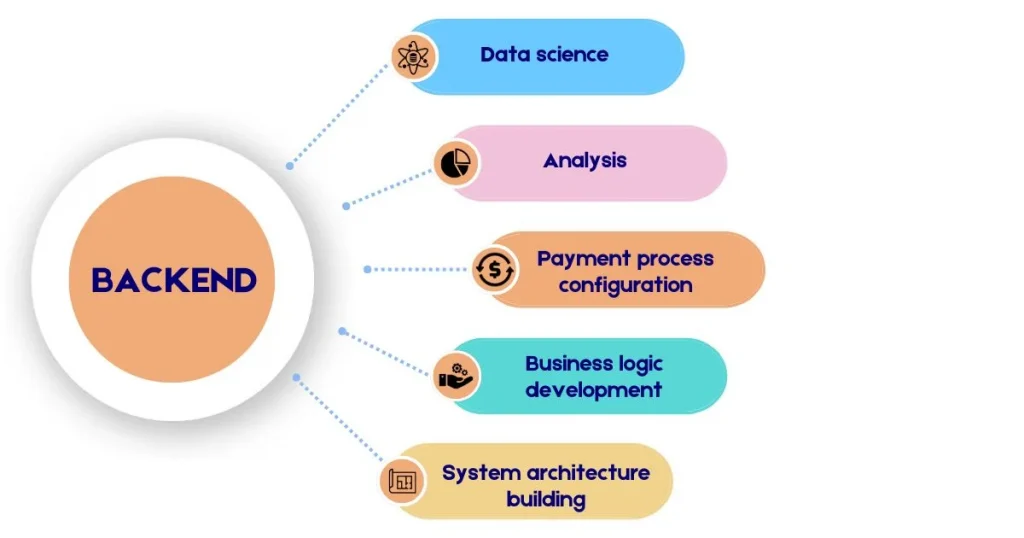
  • Google Ads: Use Google Ads to target people actively searching for your products. Create eye-catching ads with clear calls to action, and make sure your landing pages are set up to encourage purchases.
  • Retargeting Ads: Use retargeting to reach people who have visited your website before. These ads remind potential customers about your products, encouraging them to return and complete their purchase.
  • Facebook and Instagram Ads: Create attractive ads on Facebook and Instagram. Use carousel ads to showcase several products and video ads to grab attention.
  • A/B Testing: Try out different ad formats, headlines, and images to see what works best for your audience. A/B testing helps you improve ad performance based on real-time results.
  • Budget Management: Set clear budgets for your advertising campaigns and regularly check how they are performing. Adjust your bids based on how well the ads are doing to make the most of your investment.

Customer Experience: The Key to Long-Term Success

In today’s competitive market, customer experience is crucial for long-term success. As consumer expectations evolve, businesses must focus on exceptional experiences to build loyalty, retain customers, and stand out from competitors. This article examines why customer experience is vital and how businesses can enhance it strategically.

Importance of a Seamless User Experience (UX)

One of the most critical aspects of any successful e-commerce business is providing a seamless user experience (UX). Australian consumers, like those worldwide, expect an intuitive, fast, and easy-to-navigate website. A complicated checkout process, slow loading times, or confusing layouts can deter potential customers from completing their purchases. Ensuring that your website is user-friendly across all devices is key to retaining customers and increasing conversion rates.

Personalising the Customer Journey

Personalisation is at the forefront of modern e-commerce. Australian customers are more likely to engage with brands that offer a tailored shopping experience. This includes displaying personalised product suggestions, sending targeted emails, or offering special deals based on a shopper’s browsing or purchase history. Leveraging customer data and using AI-driven tools can help create a more personalised shopping journey, improving customer satisfaction and retention.

Using Chatbots and Virtual Assistants

Chatbots and virtual assistants are becoming more common in Australian e-commerce stores. They provide instant customer service, helping to answer queries, guide customers through the purchasing process, and even recommend products. Using AI-powered chatbots not only improves customer satisfaction but also allows businesses to manage customer service efficiently, especially outside regular business hours.

Enhancing Mobile User Experience

As mobile commerce continues to grow, ensuring an excellent mobile user experience is non-negotiable. Responsive website design, fast loading times, and easy navigation on smaller screens are essential. Optimising mobile payment methods, such as mobile wallets or simplified checkout processes, can also reduce cart abandonment rates and improve overall sales.

The Role of Data in E-Commerce Growth

Data is a cornerstone of modern e-commerce strategies. It provides valuable insights that can inform decision-making, enhance customer experience, and drive business growth. Here’s a detailed look at how data influences different areas of e-commerce.

Importance of Data Analytics in Decision-Making: Data analytics plays a critical role in the success of e-commerce businesses. It helps companies make smart decisions based on customer behaviour, sales trends, and performance data. By analysing data, businesses can identify which marketing strategies are working, understand what products are popular, and detect patterns in customer buying habits. In Australia, e-commerce companies that leverage data-driven insights are better positioned to stay competitive.

Utilising Customer Insights for Personalisation: Customer insights derived from data help businesses create personalised experiences. This includes targeted product recommendations, personalised email campaigns, and advertisements. Australian e-commerce companies are increasingly relying on customer insights to offer tailored promotions and improve customer loyalty. By using these insights, businesses can foster deeper connections with their audience and enhance the overall shopping experience.

Predictive Analytics for Future Growth: Predictive analytics is a powerful tool that allows businesses to anticipate future trends and behaviours. In e-commerce, this can be used to forecast demand, identify potential high-selling products, or predict customer churn. For Australian businesses, investing in predictive analytics can help optimise inventory management, marketing campaigns, and customer retention strategies, ultimately leading to long-term growth.

Leveraging Technology for Competitive Advantage

In the fast-paced e-commerce world, using technology is key to staying competitive. It helps simplify operations, enhance customer experiences, and offer insights for growth. Here’s how businesses can use technology effectively to stay ahead.

Use of AI in Automating Customer Service and Personalisation

Artificial intelligence (AI) is becoming a critical tool for e-commerce businesses looking to streamline their operations and improve customer engagement. AI-powered chatbots, for instance, automate customer service, answering frequently asked questions and resolving issues without human intervention. AI is also used to deliver personalised recommendations, helping businesses provide a tailored experience for each customer. By leveraging AI, Australian businesses can reduce costs, improve customer service, and enhance customer satisfaction.

Blockchain Technology for Secure Transactions

Blockchain technology is gaining traction in e-commerce, offering more secure and transparent transactions. For Australian e-commerce businesses, blockchain can provide enhanced security in online payments, ensuring customer data is protected. It also reduces the risk of fraud, making it easier for customers to trust online transactions. While still emerging, the use of blockchain in e-commerce has the potential to reshape the way businesses handle payments and supply chains.

Integration of Payment Gateways and New Payment Methods

Offering multiple payment options is vital for the success of e-commerce businesses. Australian consumers have come to expect flexibility in payment methods, from traditional credit and debit cards to digital wallets like Apple Pay and Google Pay. Payment gateways like PayPal and Afterpay have become popular choices for online shoppers in Australia. By integrating these payment options, businesses can appeal to a broader audience and reduce the friction in the checkout process.

Building Brand Loyalty in the Digital Age

In a world where shopping is just a click away, businesses must build brand loyalty. Brand loyalty means that customers consistently return to purchase from you because they trust and appreciate your brand. Here are some simple strategies to build customer loyalty.

Importance of Customer Reviews and Social Proof

Customer reviews and social proof are powerful tools in building brand trust. Australian shoppers, like others worldwide, often rely on reviews to make purchasing decisions. Encouraging satisfied customers to leave positive reviews on your website, Google, or social media can significantly boost your credibility. Highlighting testimonials and displaying ratings on product pages also helps build trust, making it easier to convert visitors into buyers.

Strategies for Improving Customer Retention

Keeping existing customers is more cost-effective than attracting new ones. Businesses that focus on retaining their existing customers often see higher profits. Offering loyalty programs, exclusive discounts, and personalised communication can keep customers engaged. In Australia, where competition is increasing, fostering customer loyalty is crucial to long-term success.

The Role of Loyalty Programs and Rewards

Loyalty programs are a common way to motivate customers to make repeat purchases. Australian businesses that offer rewards points, discounts, or exclusive offers for loyal customers can strengthen their relationships and increase customer lifetime value. These programs not only improve retention but also make customers feel valued, which can lead to positive word-of-mouth marketing.

Sustainability and Ethical Practices in E-Commerce

Australian shoppers are becoming more aware of how their purchases impact the environment and society. Many are willing to spend extra on products that are eco-friendly or ethically made. To attract these eco-conscious customers, online businesses should highlight their commitment to sustainable practices in their marketing. This can include using eco-friendly packaging, sourcing products responsibly, reducing carbon emissions, offering digital receipts, and cutting down on waste. By adopting these practices, businesses can appeal to environmentally-minded shoppers and help the planet. Being open about sustainable efforts is crucial for building trust. Online businesses should share their initiatives on their websites, social media, and emails to connect with Australian consumers who care about responsible shopping.

Conclusion

The future of e-commerce in Australia is full of exciting opportunities and challenges. As consumer behaviour continues to evolve, businesses must adapt by adopting emerging technologies, personalising the shopping experience, and addressing the growing demand for sustainable practices. Digital marketing strategies—ranging from SEO to influencer marketing—will play a crucial role in driving e-commerce success.

Businesses that stay ahead by embracing mobile commerce, leveraging AI, and focusing on customer experience will be well-positioned to thrive in the competitive Australian market. By implementing the strategies discussed in this blog, e-commerce businesses can build strong relationships with customers, ensure long-term growth, and maintain a competitive edge.